


PrestaShop’s true power lies in its modular architecture, which allows developers to extend functionality without modifying the core system. Developing custom modules is a crucial skill for any PrestaShop developer, enabling stores to deliver unique features, optimize workflows, and provide enhanced user experiences.
This PrestaShop module development guide takes you through PrestaShop module development, starting from beginner concepts and progressing to advanced techniques, giving developers a complete roadmap for creating professional, scalable modules.
What Is A PrestaShop Module?
A module is a self-contained package of functionality that can be installed, configured, and removed without affecting the PrestaShop core. Modules allow developers to:
- Improve functionality, such as personalized product suggestions or enhanced search criteria.
- Modify or enhance existing functionalities.
- Connect to external services like payment gateways, shipping providers, or customer relationship management (CRM) systems.
With modules, stores can be roomy and upgrade-friendly because when PrestaShop itself gets an update, nothing breaks custom functionality.
Different Stages of Module Development
Here are the overview of the crucial stages of modern prestashop module development:
Stage 1: Establishing Your Advancing Situation
You need a proper environment before you begin to create PrestaShop modules. Best practices include:
- Installing XAMPP, WAMP, MAMP or Docker for Local server setup replicating the live server conditions.
- IDE or code editor such as VS Code or PHP Storm for coding.
- Learn Git version control to track changes and collaborate with other developers.
- Installing PrestaShop in a local environment for module testing.
Having a prepared environment will ensure smoother module development, safer testing and faster debugging.
Stage 2: Module Structure Basics
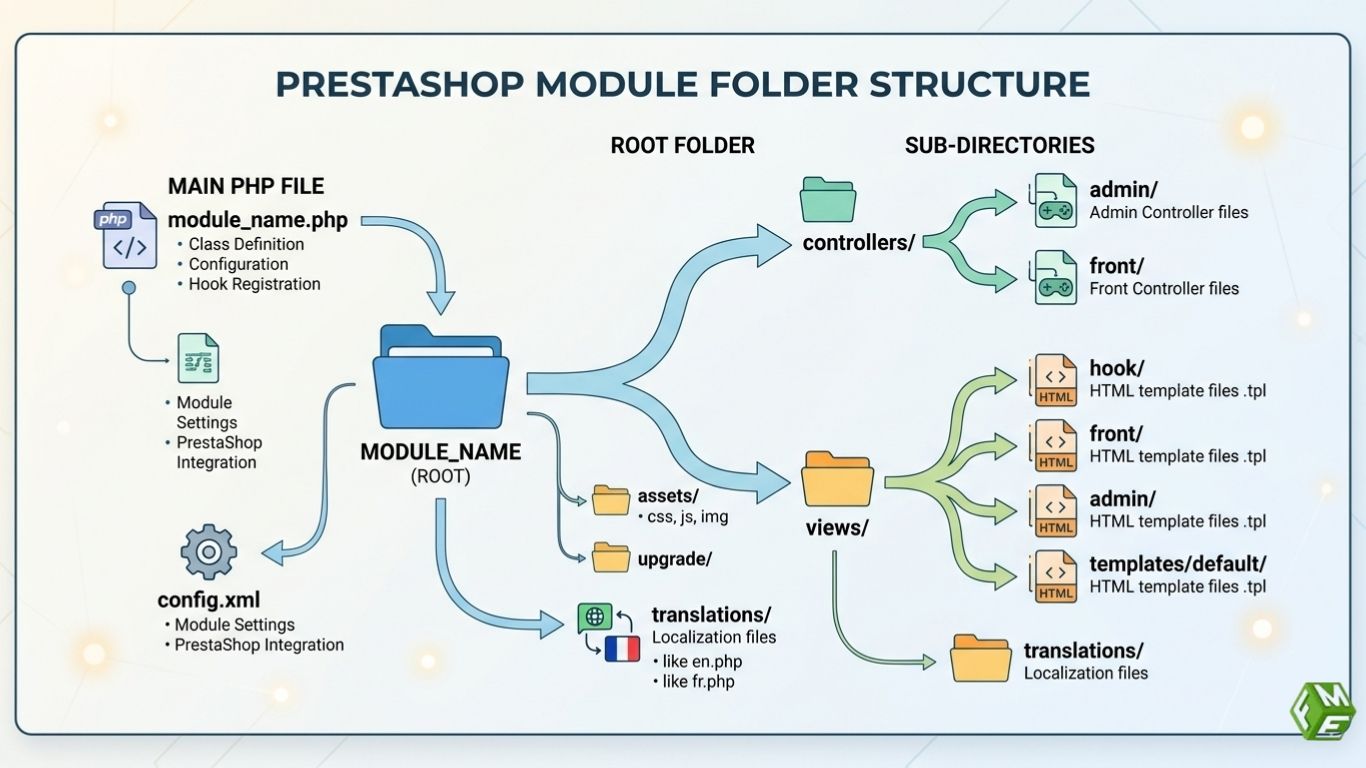
All PrestaShop modules have the same structure to guarantee their compatibility and maintainability, such as:
- Root folder: Folder named the same as your module with all the files.
- Main PHP file: The module’s controller extends Module and defines install, uninstall and hooks.
- Config. Xml: Holds configuration data such as module name, description and version.
- Controllers: Optional folder for controllers, backend and frontend.
- Views/templates: Contains Smarty templates for rendering HTML.
- Translations: Optional directory for handling translations.
This structure keeps your modules installed cleanly, so PrestaShop and your modules don't fight on updates.
Stage 3: Developing Your First Module
Create the main PHP file where you define your module class. The class must consist of at least:
- Construct() method: Defines the name, version, author and description of the module.
- Install() method: Used to register hooks and create any necessary database tables.
- Uninstall() method: Cleans up the tables, configurations and hooks.
Now that your module is installed, you can easily register it to PrestaShop hooks (cluster 6) such as displayHome or displayFooter in order to output content on the frontend. This is the basis for most of their modules.
Stage 4: Apply Hooks in Module Development
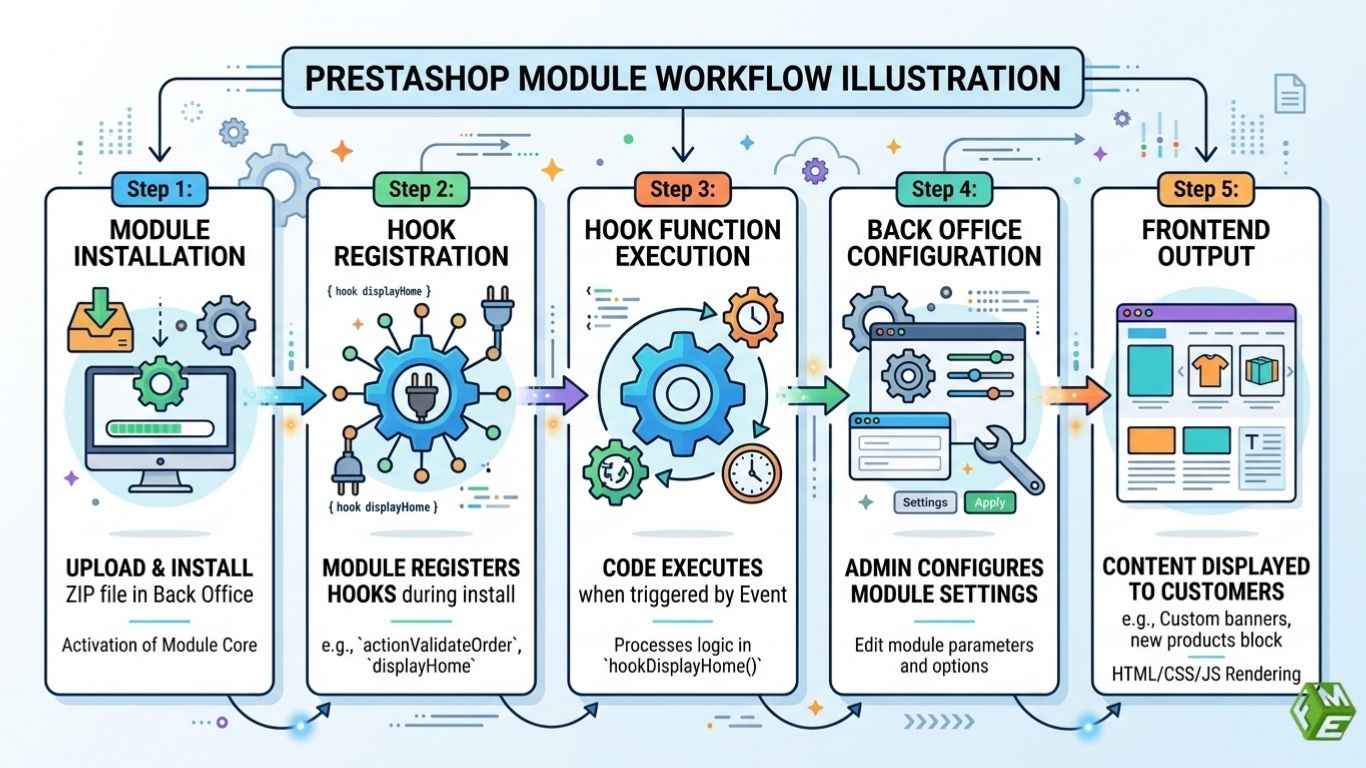
Hooks are very important if you want to extend PrestaShop without changing the core. Your module can:
- Use display hooks to show banners, product recommendations or custom content.
- Use Action Hooks to trigger logic based on specific events (order placement, customer registration, etc).
Properly using hooks makes sure your module communicates safely with PrestaShop’s workflows and is upgrade-compatible.
Stage 5: Setup and Back Office integration
Most modules need settings that merchants can change. Developers can handle this by:
- Forms: Use PrestaShop’s HelperForm to create easy-to-use forms.
- Configuration: Use Configuration::updateValue() to save settings and Configuration::get() to retrieve them.
This lets merchants easily customize how the module works.
Your module is highly user-friendly and easily adopted by non-technical store owners through integrating with the Back Office.
Stage 6: Advanced Module Development
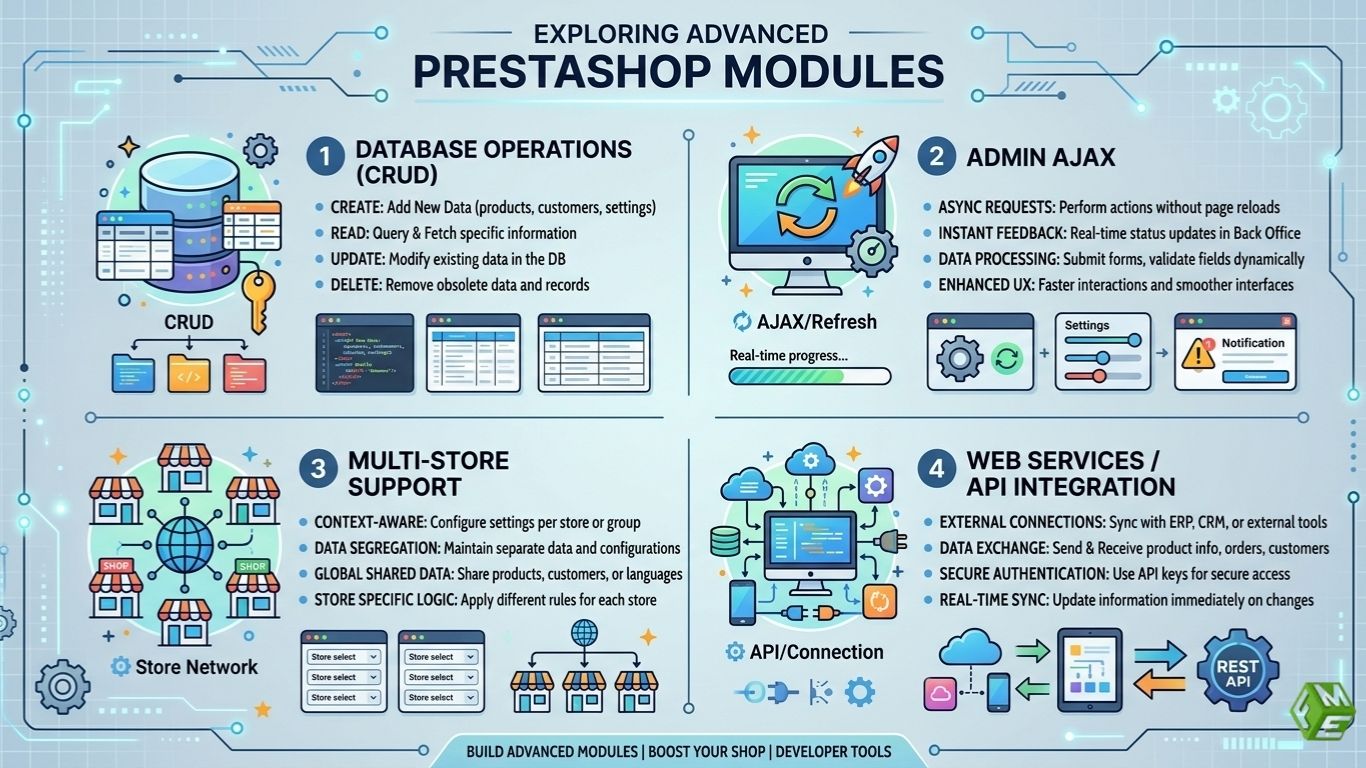
Once familiarized with basic modules, PrestaShop developers can address advanced ones, such as:
Database Operations
Use Db::getInstance() or ObjectModel to perform CRUD operations (Create, Read, Update, Delete).
Admin AJAX
Add dynamic functionality in the admin or frontend using AJAX, without needing a full page reload or custom router.
Multi-store Support
Make sure your module works correctly across multiple stores in the same PrestaShop installation.
Web Services / API Integration
Connect your module with third-party services like payment gateways, ERP systems, or external APIs.
For performance, security, and compatibility, advanced modules need extra specification as well as testing.
Stage 7: Testing and Debugging
It is always good to test before releasing a module:
- Enable debug mode in PrestaShop for tracking PHP errors, SQL issues, or template problems.
- Page conquers every sparring session to make sure they are being executed properly.
- Check how the module works with multiple themes, languages and currencies.
- Avoid the Slow Store Due to Performance Testing.
So, testing your module properly gives it stability, reliability and that it is professional level.
Stage 8: Packaging and Distribution
Once a module is ready, PrestaShop developers can:
- Zip up the module folder.
- Include installation instructions, configuration guidance, & documentation.
- Publish it on PrestaShop Addons Marketplace to get more exposure (optional).
Well-documented modules/ packages result in more adoption, less maintenance and improve your credibility as a developer.
PrestaShop Module Best Practices
When a Presta merchant hires Prestashop module developers for module development, the expert must have to take care of a few things, such as:
- Avoiding overriding of core files to Maintain Compatibility with Upgrades.
- Render data as fast and well as possible in the database/backend.
- Ensure to stick to the best security practices, such as sanitizing inputs and escaping outputs.
- Maintain proper documentation of the code to guide other developers or clients in understanding how the functionality works.
Following such practices helps your modules to be performant, scalable and future-improved.
Take Away
PrestaShop module development is a key skill for developers who want to enhance stores, provide custom solutions, and create unique features. By mastering the basics, understanding hooks, integrating with the Back Office, and applying advanced techniques, developers can deliver professional-grade modules that are scalable, secure, and user-friendly.
This PrestaShop module development guide explains that with consistent practice, proper environment setup, and adherence to best practices, even beginners can progress to advanced PrestaShop development, creating modules that empower businesses and enrich the eCommerce ecosystem.
