


PrestaShop’s flexibility and customization capabilities largely come from its powerful hook system. For any developer working with PrestaShop, understanding hooks is essential because they allow you to extend functionality without modifying core files.
In simple terms, hooks act as connection points where developers can insert custom code or features, making them the foundation of module development in PrestaShop. In this PrestaShop hooks tutorial, we will look into how to register PrestaShop hook and more.
What Are PrestaShop Hooks?
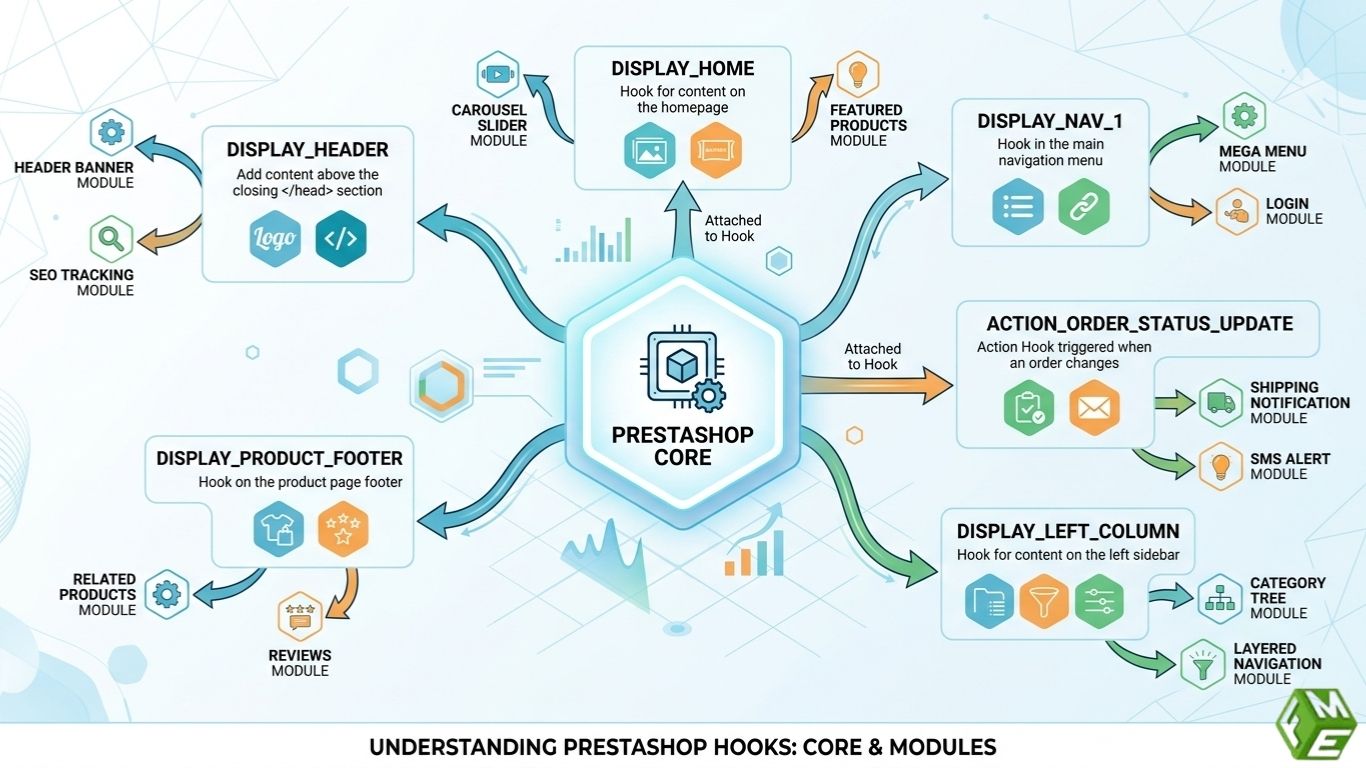
PrestaShop hooks are predefined positions or events within the system where developers can attach their custom code. These hooks enable modules to interact with the core platform without directly altering it.
You can look at hooks as the injection points in the application. Rather than editing central files, just hook your functionality into the system at set points.
PrestaShop Hooks Guide - Why They Are An Essential Part of PrestaShop
Hooks form a crucial part of the PrestaShop system, enabling developers to extend and customize stores without worrying about breaking them with future updates.
They help developers:
- Extend functionality without editing core files.
- Keep code modular and reusable.
- Ensure compatibility during upgrades.
- Add functionality smoothly into established work processes.
Hooks make it easy and enable developers to write clean code without the need for heavy modifications or overriding core files, which leads to a lot of maintenance and errors.
Types of PrestaShop Hooks - PrestaShop Developer Hooks Explained
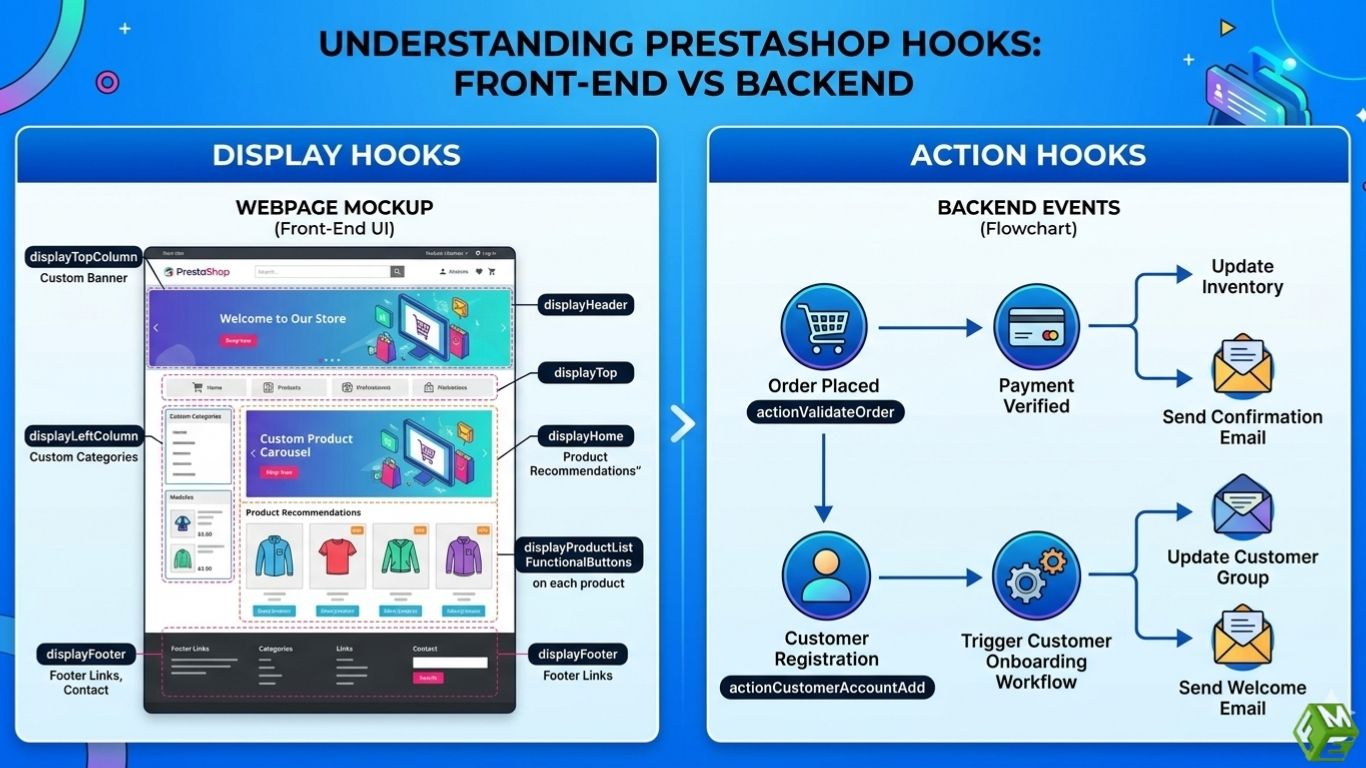
In PrestaShop, there are primarily two different categories of hooks used in the development process.
Display Hooks
Display hooks or PrestaShop front office hooks will determine what is shown on the front-end or back-end of the store. They enable developers to place content in particular sections of a page.
For instance, a developer can apply a display hook to:
- Add banners to the homepage.
- Add product recommendations on the product pages.
- Show custom blocks in the header or footer.
Most of these hooks apply to visual elements and user interface improvements.
Action Hooks
Action hooks are triggered based on events occurring in the system. These are not for displaying content, but are used by developers to run logic or perform operations.
For example, use action hooks to:
- Email after the order is placed.
- Change order data before it is stored.
- Trigger workflows during customer registration.
Hooks that are needed in order to manage background processes and business logic.
What are Hooks In Module Development?
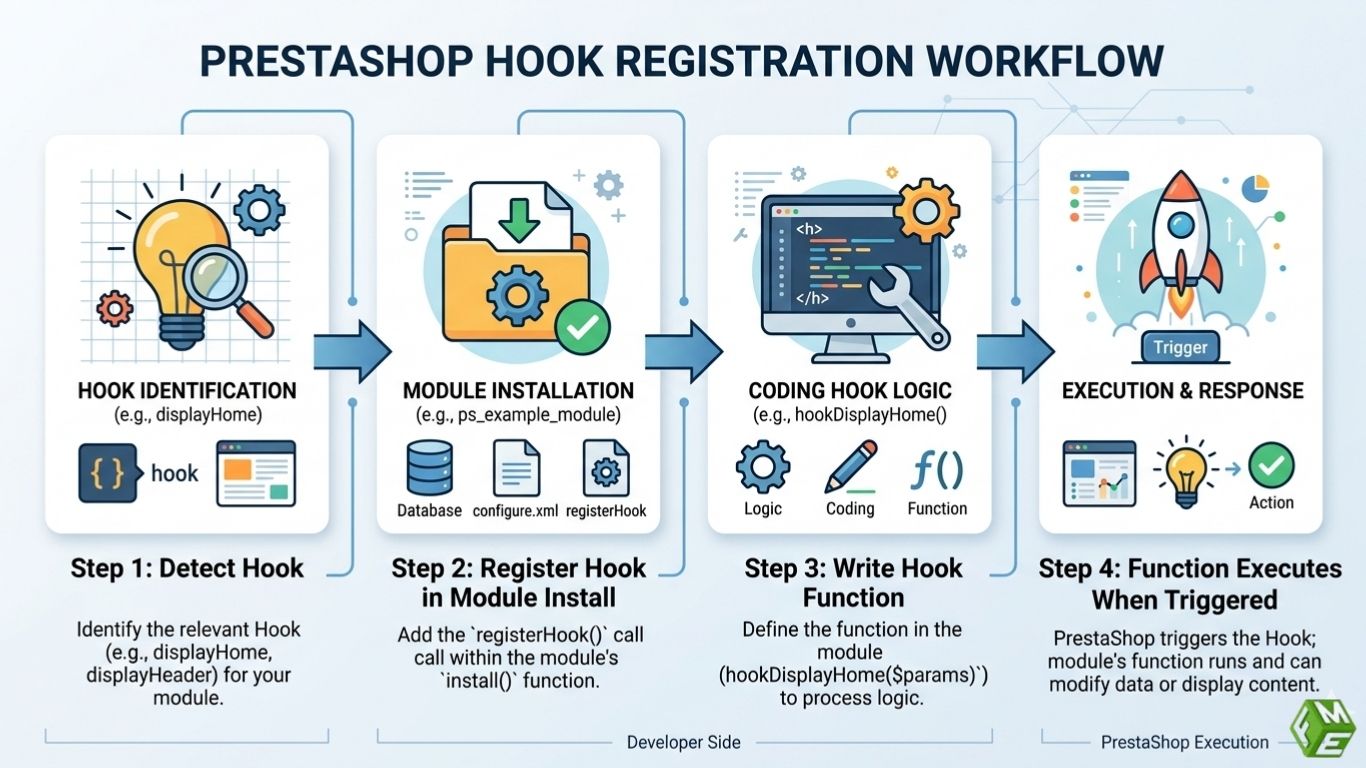
In a PrestaShop module development, developers register their modules to specific hooks when building the module.
The typical process involves:
- Detect what hooks to use for where/when you want your function to run.
- Registering the hook in the module’s install method.
- Writing a function that is executed when the hook triggers.
For instance, if you want to render content on the homepage, you would register your module to a display hook like display_home, and the output would be defined in that function.
The modular pattern enables developers to add and remove features independently from the rest of the system.
Commonly Used PrestaShop Hooks
Certain hooks are commonly used in PrestaShop development as they relate to critical areas of the store.
- Display Header: Inject scripts, styles, or meta tags into the header.
- Display Footer: add content to the footer.
- Display Home: Customize homepage content.
- Display Product Additional Info: Extend product pages with additional information.
- Action Product Add: Run logic when a product is added.
- Action Order Status Update: Triggers actions when order status changes.
Knowing these common hooks allows developers to construct features more quickly.
Best Practices for Using Hooks
It is always important to pick the best hook for your functionality instead of pumping any code. Excessive usage of hooks can do worse and slow down the store, besides making debugging more difficult.
Another thing that developers should always remember about their hook functions is that they need to be lightweight and optimized, especially in the case of display hooks, where you have hooks impacting your page load times.
Another best practice is to never overwrite core files if the goal can be accomplished by a hook. This provides your module with compatibility for future versions of PrestaShop.
Finally, always thoroughly test the hook implementation on different pages/devices to get the desired result.
Common Mistakes Developers Should Avoid
Hooks are often misused by beginners and can cause performance problems or even broken functionality.
One of them is using the incorrect hook for a particular job, where, as a result, the code does not execute. Another problem is hooking too much complexity, which can slow down the website.
That’s why most store owners hire PrestaShop developers to ensure the hooks are properly registered and functioning.
Why Are Hooks The Heart and Soul of PrestaShop Development
Hooks make PrestaShop super flexible and developer-friendly. They enable developers to implement custom features, connect third-party services, and tailor store behavior, all without altering the core solution.
This architecture is modular, making it easy to maintain, upgrade and scale stores in the long run. For companies, this translates to reduced risks, lower maintenance costs and increased flexibility to respond to changing requirements.
Take Away
Understanding PrestaShop hooks is essential for any developer working with the platform. They form the backbone of module development, enabling safe, scalable, and upgrade-friendly customizations.
By mastering hooks and following best practices, developers can create powerful, flexible features that enhance both store functionality and user experience, making them a critical skill in modern PrestaShop development.
