


A visually appealing, responsive, and functional store is essential for eCommerce success, and PrestaShop theme development makes this possible. Modern PrestaShop themes leverage Twig templating, Symfony components, and advanced front-end techniques to create stores that are both attractive and highly functional.
This PrestaShop theme development guide explores the core concepts, tools, and best practices for developers looking to master PrestaShop theme development in 2026.
What is PrestaShop Themes All About
A PrestaShop theme is responsible for the store's appearance, such as layouts, typography, colors, button types, product display and interactive parts. While modules extend functionality, themes are about front-end UX.
Unlike older APIs, modern themes take advantage of PrestaShop Twig templates, which decouple presentation logic from the PHP code and make it easier to maintain theme files without resulting in conflicts during PrestaShop upgrades. The themes integrate closely with Symfony controllers, which coordinate the flow of data between your back end and your templates.
Twig: The PrestaShop Theme Development Language
PrestaShop 1.7 and later use the Twig templating engine, which allows developers to:
- Make templates clean and readable, no PHP logic needed.
- Display dynamic content, including product lists, banners and custom blocks with loops and conditionals.
- Use filters and functions to modify content directly in your templates.
- Keep the logic separate from presentation so that your themes can be upgrade-safe.
If, for instance, we were displaying a list of featured products in Twig it could be as follows:
- {% for product in products %}.
- {{ product. name }}.
- {{ product. price|currency }}.
- {% endfor %}.
It helps to keep templates legible and maintainable while not needing to touch any PHP code.
Symfony Components In Theme Development
Symfony backs the themes in PrestaShop due to its structured and reusable architecture on a back-end level.
- Controllers: Accept incoming requests, gather data, and pass it to Twig templates.
- Routing: Define URL structure and bind requests to controllers.
- Services: Expose reusable logic, e.g., products/categories / CMS pages.
By learning Symfony, developers can build modular and maintainable themes that are scalable and compatible with future versions of PrestaShop.
Theme Structure and Essential Files
Let’s now get into the PrestaShop theme developer tutorial. A typical PrestaShop theme has a defined structure to ensure compatibility and maintainability. So, this is what PrestaShop Developers do when developing themes:
PrestaShop Theme Structure
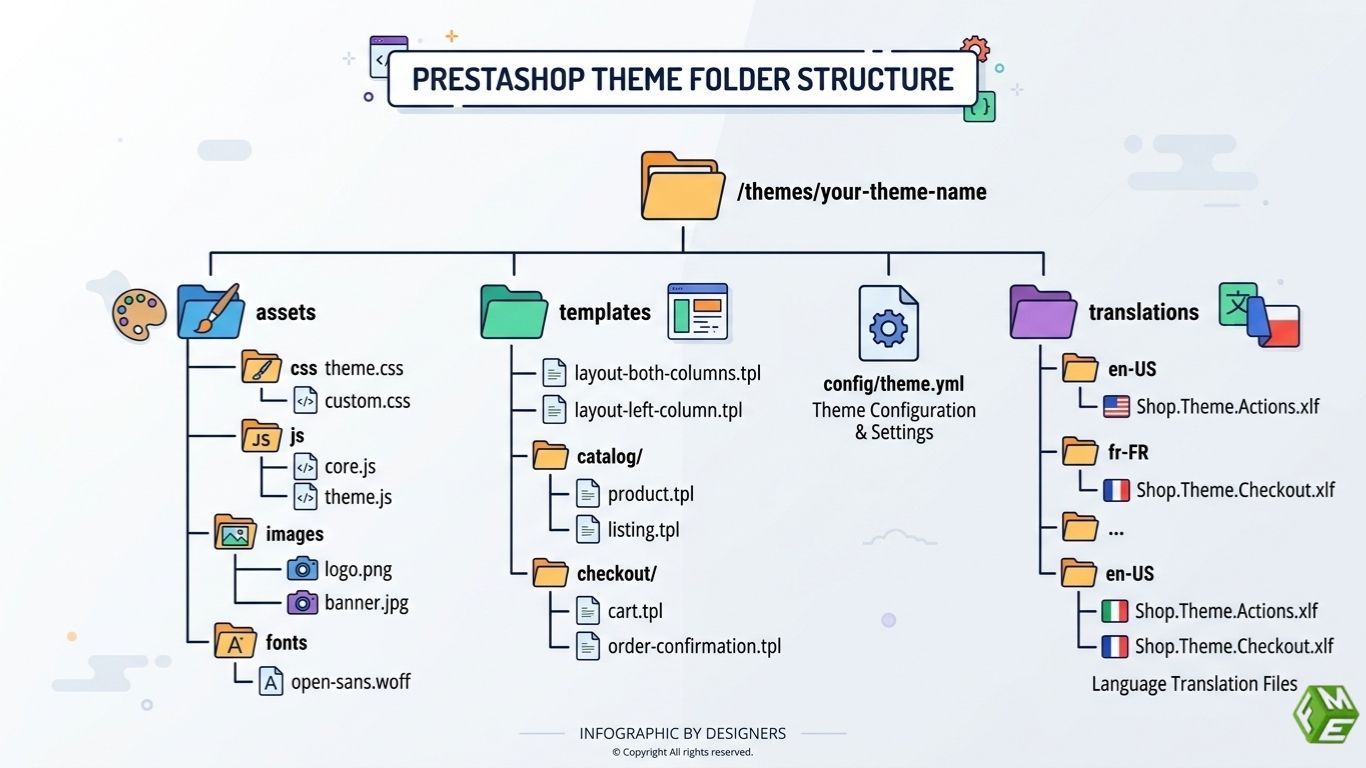
A typical PrestaShop theme is organized into these main parts:
Assets
Contains CSS, JavaScript, images, and fonts.
Templates
Holds Twig files used for pages, layouts, and blocks.
Config/theme.yml
The main configuration file that defines theme settings, layouts, and inheritance.
Translations
Stores language files for translating text in the theme.
Familiarity with this structure is crucial for developers looking to tailor and expand themes quickly.
Key Front-End Technologies
In addition to Twig and Symfony, front-end development is also crucial for the modern PrestaShop theme: The important component of it is:
- HTML5 & CSS3: Create semantic, responsive layouts.
- JavaScript & jQuery: Add interactive elements such as sliders, modals and dynamic filters.
- Bootstrap or other CSS frameworks: Speed up building a responsive layout.
- CSS Preprocessing СSCSS/SASS: Organize your CSS effectively with variables, nesting, and mixins.
- Responsive & Mobile-First Design: A must-have as more eCommerce happens on mobile.
Browser compatibility is another challenge for developers, as themes must then render properly in Chrome, Firefox, Safari and Edge.
Hooks and Dynamic Content
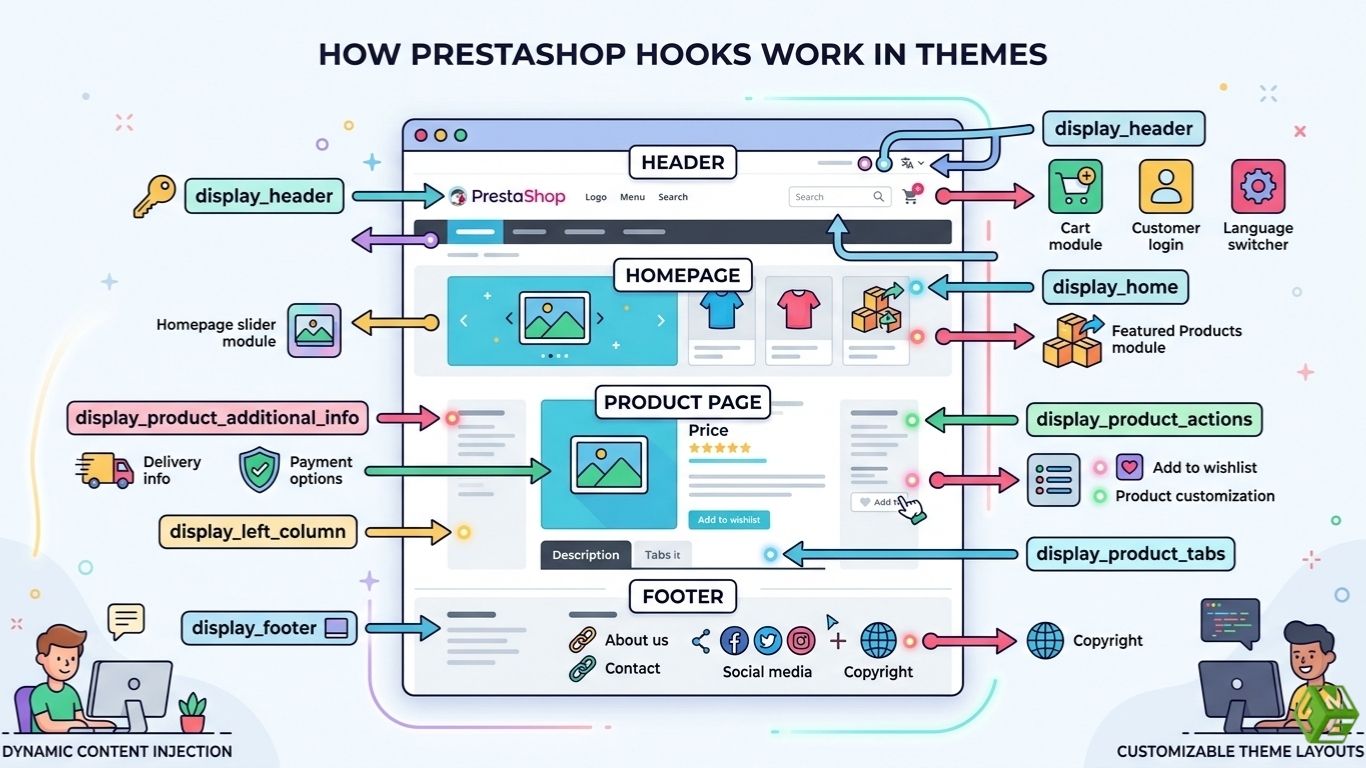
With hooks, PrestaShop theme developers can also inject content dynamically into their theme files without editing core files. Commonly used hooks include:
- Display Header: Insert custom scripts, meta tags or stylesheets.
- Display Footer: Add banners, disclaimers, or links in the footer.
- Display Home: Customize homepage blocks.
- Display Product Additional Info: To display custom product information or any kind of promotional component.
Using PrestaShop hooks ensures that themes are modular and extensible, making for safe upgrades and easy maintenance.
Advanced Theme Development Techniques
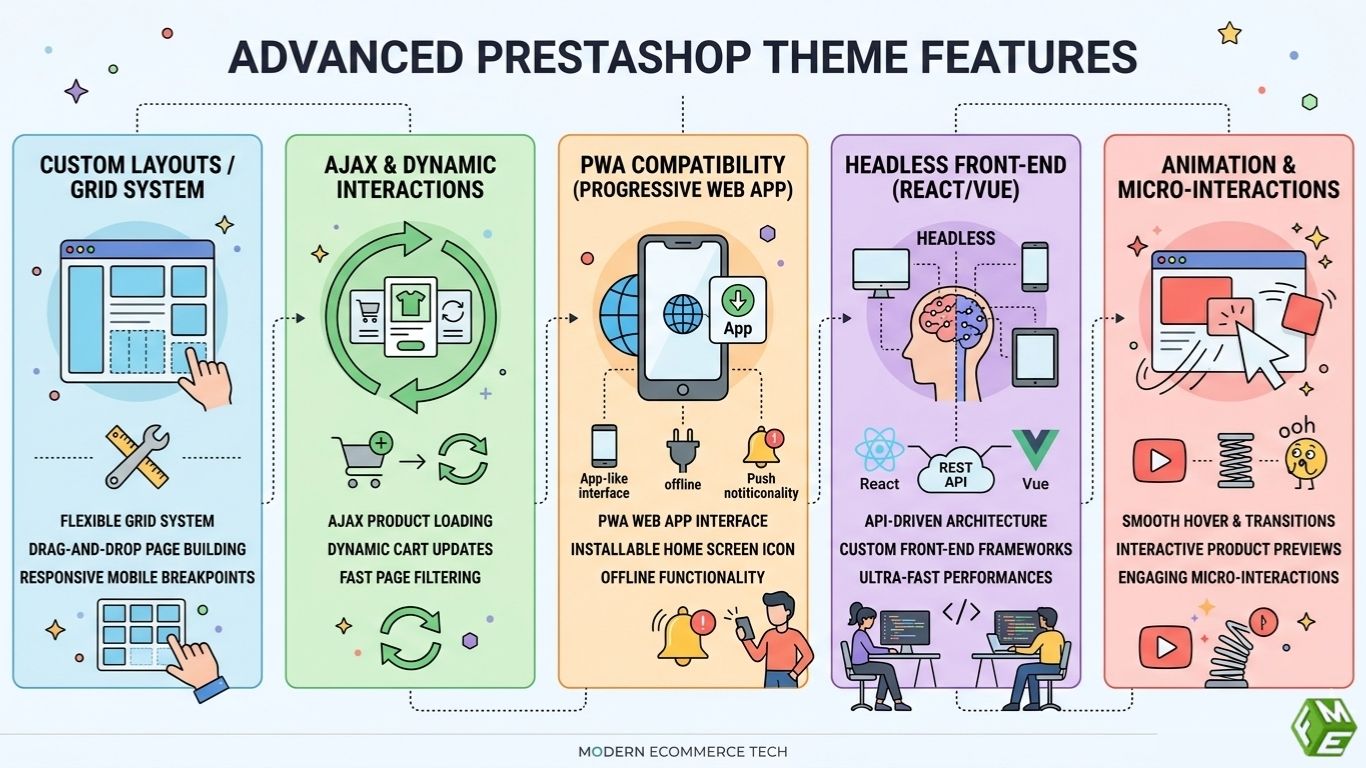
Custom Layouts and Grid Systems
Developers can use PrestaShop's grid system to build custom layouts for product pages, category pages, and CMS pages. Grid-based layouts mean the content adjusts according to the device being used.
Ajax and Dynamic Interactions
Developers can learn AJAX features to optimally enhance user experience with actions such as adding products to cart, filtering, or sorting without the need for a full page refresh.
Progressive Web Apps (PWA) Compatibility
Discussion on the integration of PWA features within a theme provides mobile users with access to an app-like interface that minimizes load time and is available offline, including push notifications.
Headless Front-End Approaches
Expert PrestaShop Developers can choose either React or Vue.js coupled with PrestaShop APIs to separate the front-end from the back-end, leading to dynamic content in interactive stores that can be fast updated.
Animation and Micro-Interactions
Subtle animations for hover effects on product cards and buttons enhance engagement and add modernity to the store’s look without sacrificing performance.
SEO and Accessibility Best Practices
A well-developed theme needs to support both the SEO and accessibility with:
- Using semantic HTML as it indexes better.
- Using alt text for images and aria labels to aid accessibility.
- Minifying CSS/JS and compressing images.
Mobile-first design boosts user experience and search rankings.
These PrestaShop frontend development practices help the store rank on search engines and create a friendly experience.
Testing and Debugging
Extensive testing makes sure your theme works on different devices, browsers and configurations:
- Test responsiveness on various screen sizes.
- Test to ensure that your app renders correctly in different browsers.
- Good for verifying dynamic content with hooks and AJAX functions.
- Identify page load speed, optimize assets.
Syntax errors can be checked in the Twig templates and backend issues in the PHP logs.
A tested theme is a stable, production-ready product.
Performance Optimization
Theme performance has direct implications on both conversion rates and user experience:
- Minify CSS and JavaScript files.
- Use lazy loading for images.
- If you have dynamic content blocks, optimize your queries.
- Optimize rendering speed by flatting DOM
These optimized themes make the store run much faster and customers happier, and thus lead to better SEO rankings.
Version Control and Collaboration
Make use of the Git and services like GitHub or GitLab for theme development management:
- Keep records and handle different versions.
- Collaborate efficiently with other developers.
- A History of updates to allow for debugging/deployment.
With version control, you have a working professional workflow with fewer conflicts, which makes maintenance easier.
Take Away
PrestaShop theme development in 2026 requires a mix of design skills, front-end expertise, and Symfony/Twig knowledge. By mastering modern techniques like responsive layouts, hooks, AJAX interactions, PWAs, and headless architecture, developers can create scalable, visually appealing, and high-performing stores.
Following best practices for SEO, accessibility, performance, and testing ensures that themes not only look great but also deliver exceptional user experiences and business results.
