


With WhatsApp ordering in PrestaShop, your customers get an efficient conversational ordering experience. Rather than going through multiple checkout steps, customers can simply message the store, confirm the order, and even place the order in real time. This is more than just a chat option. It offers a full PrestaShop WhatsApp order flow, leading customers from interest in a product to order confirmation, all within a messaging app.
In this guide, we will get into the experience of clicking the WhatsApp button, confirming payment, and delivery, to show the steps involved and the overall simplicity in the shopping experience.
What Is A WhatsApp Order in PrestaShop?
In PrestaShop, a WhatsApp order is a purchase done via WhatsApp and completed through the traditional checkout process. Customers no longer need to fill out long forms or go through multiple web pages. They can simply send a message with their product or cart details and finalize the order in the chat. It is that simple.
When customers checkout through standard checkout, they go through rigid steps such as cart selection, address input, payment, and confirmation. In contrast, WhatsApp acts as a conversion channel, integrating communication and checkout into one process. This flexibility truly enhances the experience for customers who enjoy the direct interaction.
Considering there will be many different WhatsApp orders, we have characterised them in the following ways:
Product Inquiry → Order: A customer inquires about a product (e.g., size, stock) via chat, and confirms the purchase.
Cart Order: A customer shares a WhatsApp cart so the admin can complete multiple items in one go.
“Buy on WhatsApp” Direct: Customers use a button to start an order without going to checkout.
With the PrestaShop WhatsApp chat to order, customers can use WhatsApp to order easily and instantly without having to go through a long process. Yes, the Prestashop merchants can effortlessly use this feature with the Prestashop Whatsapp chat and order module.
Customer Order Process in Whatsapp
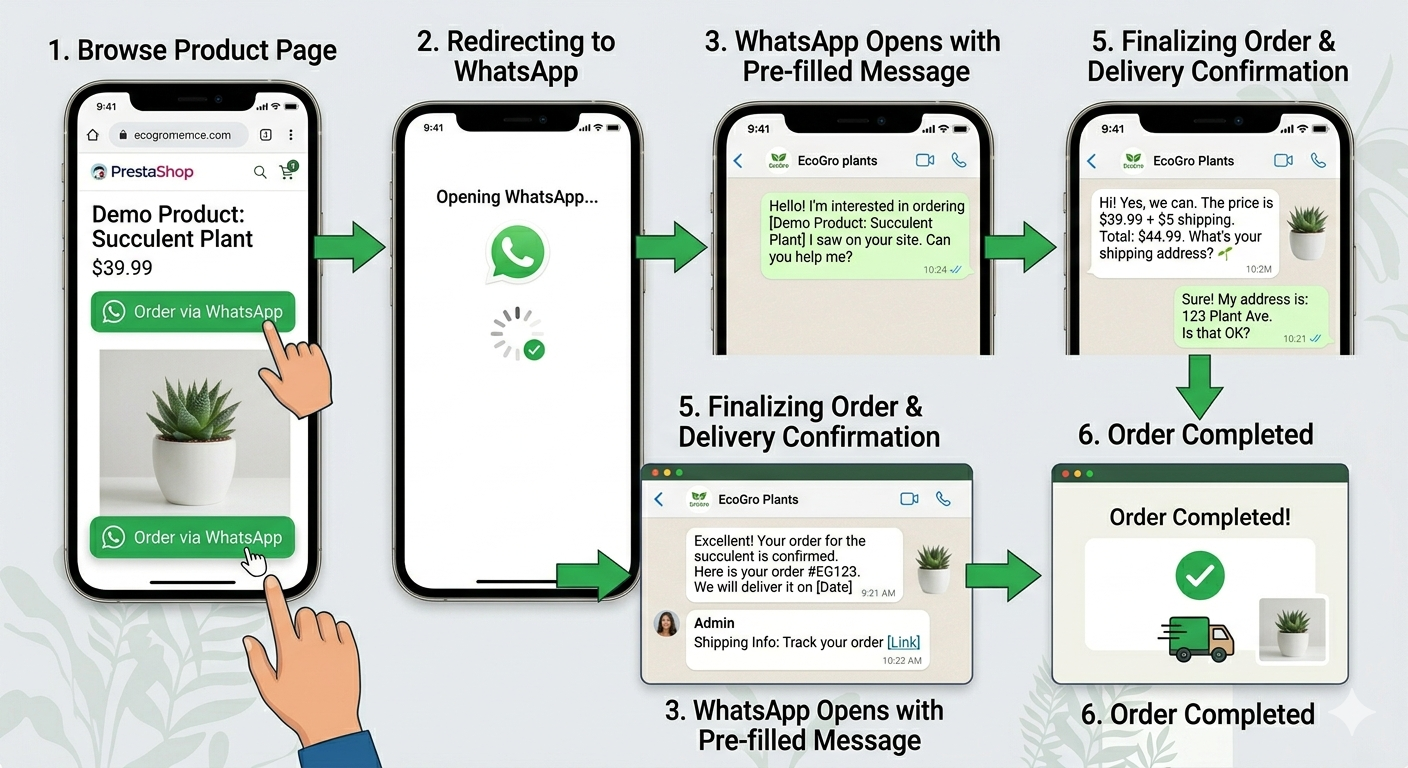
Let’s break down the customer’s PrestaShop WhatsApp order process, step-by-step.
Step 1: Customer Clicks on WhatsApp Order Button
The journey begins when a customer clicks on the WhatsApp order button set on the store. This button can be placed on product pages, on the cart page, or set to float to show on the whole website.
For mobile phones, clicking the button immediately takes them to the WhatsApp application. For desktops, it will take them to WhatsApp Web. Either way, the experience is seamless, and there are no steps required from the customer.
What’s also great is that a pre-filled message will open that includes the product/cart details, and customers will not have to type it, and will be able to enter it without any errors.
Step 2: Details of the Product/Cart Are Sent to WhatsApp
When the customer opens WhatsApp, they will see a pre-filled message that includes the following information: - Product name - Price - Quantity - Variants (size, color, etc.)
Example: “Hi, I’d like to order 2 units of the Classic Leather Tote in brown. Please confirm availability.”
Automation like this reduces friction a lot, as customers do not have to remember product details and will not have to switch tabs to do this, which ultimately speeds the process up and increases customer satisfaction
Step 3: The Customer Confirms the Order Sent Through the WhatsApp Chat
After sending the message, the buyer is now in a live chat with the store, where the real decision-making takes place.
The admin, for example, can confirm stock availability, make recommendations, and answer inquiries, while the buyer can: - Provide a delivery address - Select a payment option (COD or online) - Make custom requests (such as changes in engraving, color, etc).
For instance, a customer buying a custom watch might say, “Can you engrave initials on the back?” This step interacts with the customer, building a sense of trust, and secures the order before it is confirmed.
Step 4: The Order Is Final
Once all details are confirmed, the order is finalized either manually or through other assisted processing, where the admin can confirm the order in PrestaShop.
- Share a link for payment.
- Follow the instructions for COD.
This simplifies the process by removing the complexities of checkout pages, and instead, they are doing a human-assisted confirmation. This also helps simplify the process for the customer and makes the process faster as well.
PrestaShop Whatsapp Orders - Admin Perspectives
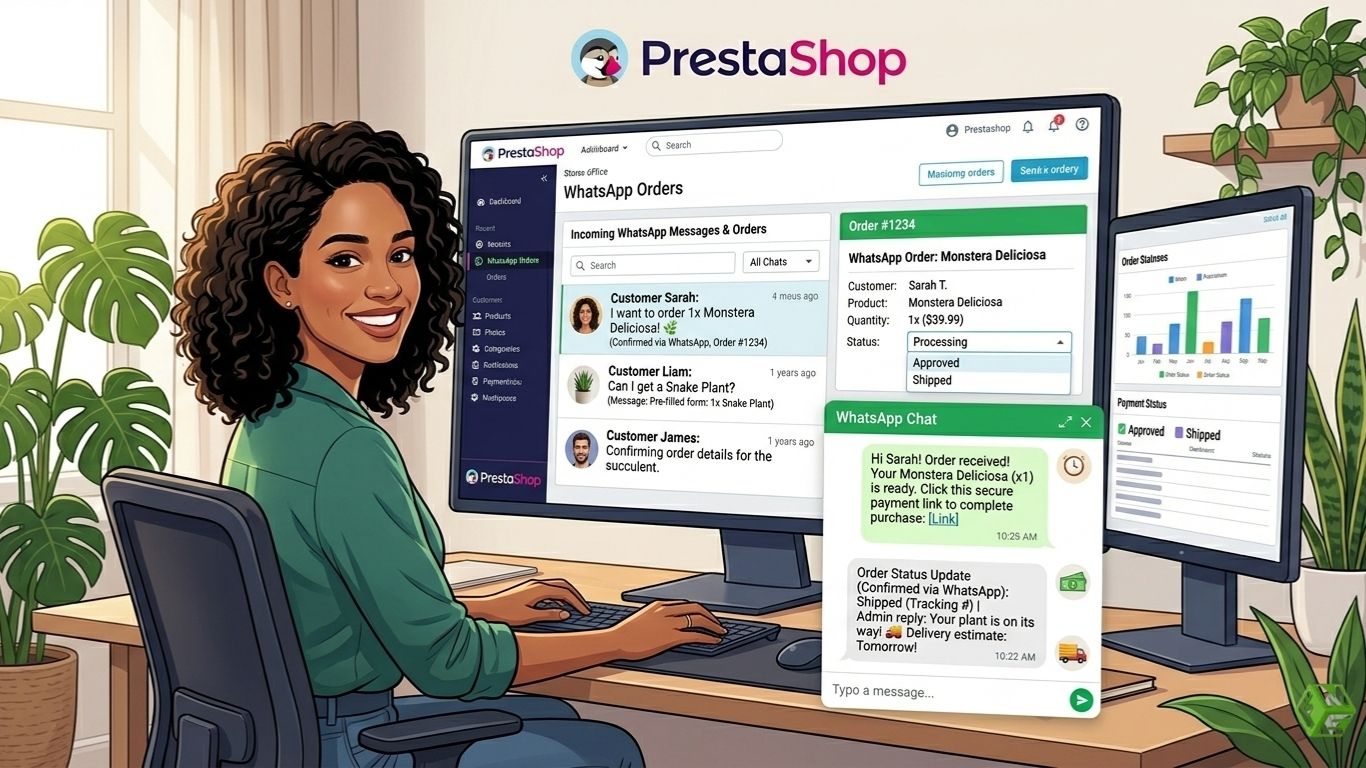
Whenever a user sends a WhatsApp message, it goes directly to the admin as a message to their phone, or it shows up on their dashboard. The message has the product or cart information and makes their request clear.
For example, an admin could get the message:
“Hi, I’d like to order 3 wireless headphones (Black). Please confirm price and delivery.”
This is a great system as it helps to capture the customer at the right time and helps to make a sale.
Order Creation through WhatsApp
The order creation through WhatsApp is a unique way to confirm the order. The admin, like any other user, has to use PrestaShop to confirm the order. This has the following requirements:
- Changing the status of the order (confirmed, shipped, delivered).
- Adjust the stock accordingly.
- Set the payment status (COD or prepaid).
For example, the customer can choose COD, and the admin will keep the order as is. If the customer has prepaid, the admin can share a payment link and confirm the order once the payment has been made.
Customer Communication and Follow-Up
WhatsApp Commerce offers the possibility of customer communication throughout the purchasing process, including after the order has been placed. Administrators can do the following.
- Notify customers of the order status.
- Share tracking information.
- Provide updates regarding the delivery.
As an example, an admin can send the following message via WhatsApp: "Your order has been shipped, and delivery will be done tomorrow between 2-4 PM."
Moreover, merchants can send follow-up messages later to customers to send offers or product recommendations to encourage repeat purchases.
WhatsApp Orders vs Standard PrestaShop Checkout
|
Feature |
Whatsapp Orders |
Standard Checkout |
|
Checkout steps |
Minimal |
Multiple steps |
|
Cart abandonment |
Low |
High |
|
Customer trust |
High |
Medium |
|
Mobile experience |
Seamless |
Can be complex |
|
Support interaction |
Built-in |
Separate |
By integrating checkout and communication, WhatsApp Orders streamlines the purchasing process. In contrast, older methods increase customer friction by separating these two steps.
When WhatsApp Orders Are Ideal
Orders through WhatsApp are effective in the following situations:
- Market with Cash on Delivery: Customers like to confirm orders in the chat before paying for the order at the time of delivery.
- Custom Pricing: Ideal for products like tailored shirts or other items where prices are negotiable.
- High-Value Items: Items like furniture and electronics need real-time dialogue before making a purchase.
- B2B/Wholesale: Businesses can finalize negotiations through WhatsApp.
- Businesses with local delivery: Restaurants, bakeries, and local stores can quickly place orders and coordinate delivery.
In the above cases, WhatsApp, compared to traditional checkout systems, adds the most value.
Take Away - How WhatsApp Orders Boost Sales and Keep Customers
Orders through WhatsApp simplify the buying process by removing unnecessary steps. No more long forms or complex navigation. Customers can confirm everything in the chat.
With real-time communication, customers are reassured instantly, and decisions are made more quickly. For instance, an on-site shopper can confirm product availability instead of leaving.
The human-assisted checkout system fosters trust, particularly with first-time shoppers. When paired with mobile-first tendencies, this leads to increased conversion and reduced abandoned carts.
