


WhatsApp has become a powerful eCommerce tool in 2025, enabling faster, more personal communication with customers. It helps businesses connect instantly where users are already active, improving engagement and trust.
It also solves key challenges like cart abandonment and slow support. This guide covers how PrestaShop stores can use WhatsApp for chat, orders, automation, and conversions.
What Is the PrestaShop WhatsApp Order & Chat Module?
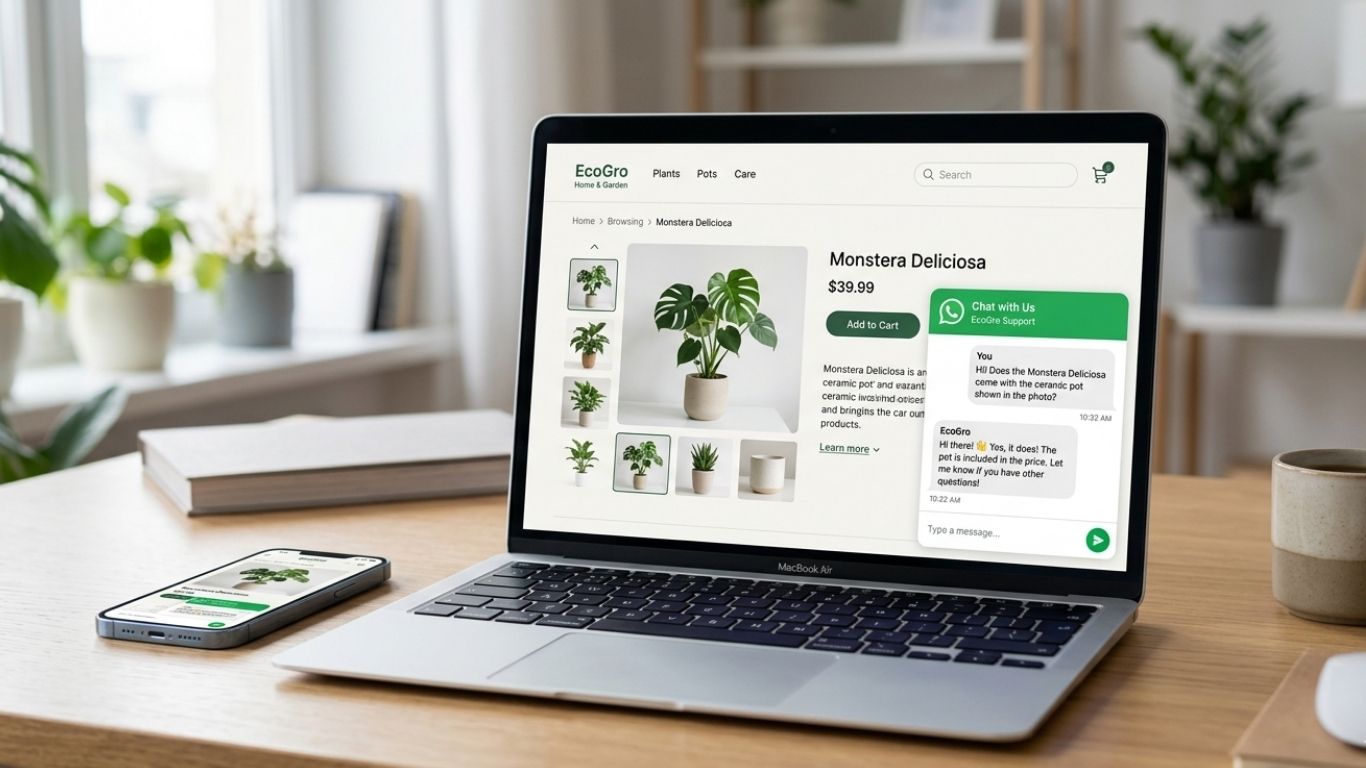
A PrestaShop WhatsApp module is an integration that allows store owners to connect their shop directly with WhatsApp for real-time communication and order processing. Instead of relying only on traditional checkout or contact forms, customers can instantly start a conversation or place an order via WhatsApp, making the buying experience faster and more interactive.
The module also enables product-specific messaging, cart sharing, and messaging with pre-filled order information. Unlike standard WhatsApp “Click to Chat” links, it allows integration with WhatsApp Business and can be positioned at multiple places within your store, including product and cart pages, at the top of the page, and as a sticky button.
The FME WhatsApp Order & Chat Module also allows for chat support to be integrated with order placement, enabling merchants to respond to inquiries, confirm orders, and foster close relationships with customers through a chat platform with which they are already familiar.
Why Use WhatsApp on PrestaShop Stores in 2026?

Customers’ preferences are changing to conversational commerce and instant messaging as eCommerce evolves. Customers want instant messaging with live agents, a personal touch through chat and a frictionless purchasing process. WhatsApp is the ideal platform for these services with its instant messaging, chat support, and order placement features.
WhatsApp also calms customers’ fears in trust-sensitive markets. Customers are provided with chat support to directly communicate with the business, ask questions, and confirm details, which is a more rapid means to reduce uncertainty and help them to make buying decisions than traditional email, WhatsApp live chat, or standard chat.
Also, WhatsApp has removed friction from the buying journey by streamlining communication and shortening checkout steps. Customers do not have to navigate multiple pages to confirm an order, as they can do so through chat, and this is an advantage for mobile-first users. This direct method of order confirmation chat is believed to drastically raise the odds of the business meeting its goals.
Functions of the PrestaShop WhatsApp Module
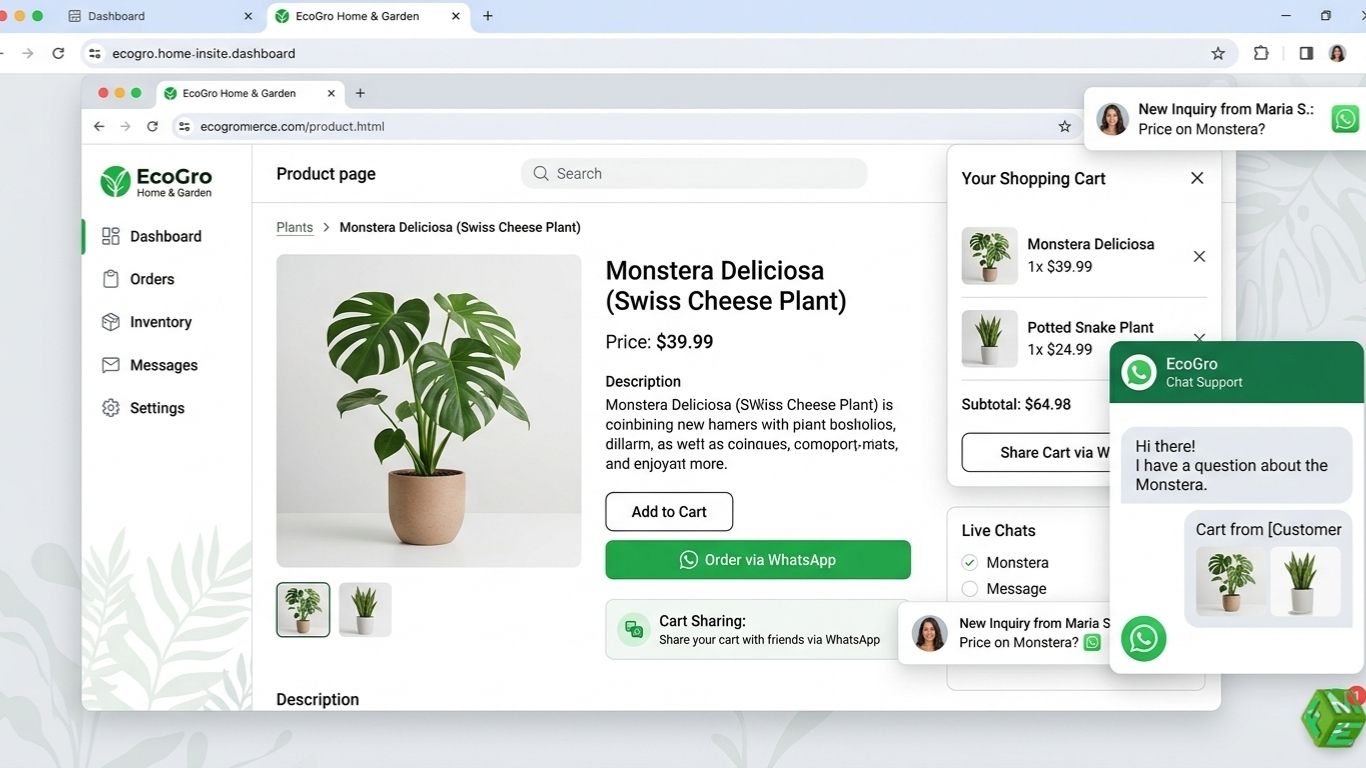
Merchants can now make use of the PrestaShop WhatsApp module to support chat and order functions to enhance the user experience. This creates a seamless experience and chat function for instant merchant-customer engagement. Furthermore, it reduces cart abandonment and increases conversion rates for both mobile and desktop users.
Floating and Fixed WhatsApp Chat Button
Engaging in and receiving WhatsApp customer support PrestaShop is made easier and faster through the use of buttons that have chat functionality.
Product-Based WhatsApp Orders
With the “Order via WhatsApp” feature, customers are able to create a WhatsApp order or inquiry message that contains pre-filled order details for the product.
Cart & Checkout via WhatsApp
Outbound chats can be used to confirm cart orders by literally sharing the entire cart.
Multi-Agent/Multi-Number Routing
Merchants don’t have to miss inquiries by assigning different contact numbers to different teams and or departments to manage inquiries more efficiently.
Pre-Filled Messages (Product, Price, Cart)
For quicker ordering and less manual intervention, Presta merchants can set messages to be pre-populated for the product, its price, or the cart.
Compatibility With WhatsApp Business
Verified business accounts can manage chats more professionally with the WhatsApp Business API.
Desktop and Mobile
Businesses can cover the complete customer journey through chat/order features on all screens. Both engagement and conversion will increase.
How WhatsApp Orders Work in PrestaShop (Admin & Customer Flow)
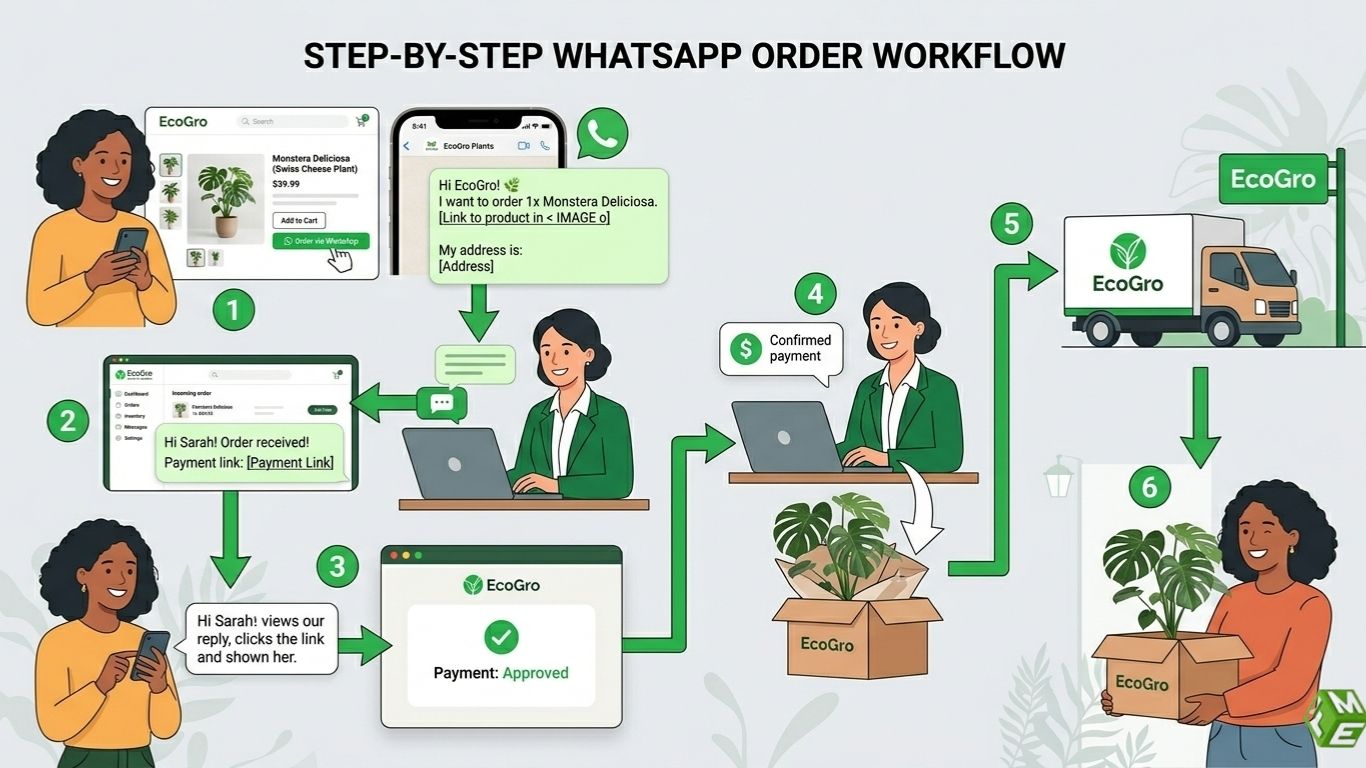
The order-placing mechanism for customers and store admins is simplified by the integration of WhatsApp with PrestaShop. Here is a practical example of how the process works.
Customer Flow
Product Browsing
A PrestaShop store sells custom leather handbags. For example, a customer visits the store looking for this specific product. There is an “Order via WhatsApp” button on the product page.
Chat Initiation
Upon clicking the whatsapp order button, a WhatsApp conversation opens. The message is pre-filled and looks like this:
“Hi, I’m interested in the Leather Classic Tote, size medium, color brown. Please confirm availability and price.” This customer message is an inquiry.
Order Placement
The customer message is an inquiry about this product. The store usually has an automated reply set up for such inquiries that include the availability, total price, and payment options.
For example, the store admin can reply to this WhatsApp message and say, Hi Sarah! The Medium Brown Tote is available. You can pay via WhatsApp Pay or COD. Please confirm if you’d like to proceed.
The conversation continues for order delivery and other details, and customer confirmation serves as an order trigger. The use of human-supported checkout assists in reducing checkout friction and especially fosters a sense of trust when addressing first-time buyers.
Admin Flow
Real Time Order Reception
Using the module dashboard, Admins can see the type of product, the amount ordered, and the customer’s details. They also quickly receive the WhatsApp customer order.
Order Payment Processing or Cash on Delivery
If a customer ordered 3 headphones, for example, the admin could respond as follows: “Hi Alex! Your order of 3 wireless headphones is ready. Payment can be done through this link, or we can arrange for COD delivery tomorrow."
Order Tracking and Follow-up
Order tracking is a feature of Prestashop, and admins use this tool to communicate order status to customers. They also use the tool to communicate about changes to the order or to suggest other products for upsell.
An example of what this message may look like is below. “Your headphones have been shipped and will arrive by 3 PM. Would you like to add a charging case at 10% off?”
Customer Loyalty and Record Keeping
Retention strategies are made simple by the stored conversations in the WhatsApp chat history. Admins can easily offer returning customers promotions.
An example of this is: “Hi Alex, we just got the new Bluetooth headphone model. Interested in checking it out?” Sent a month after the receiving customer has ordered.
Cash on Delivery (COD) versus WhatsApp-Assisted Checkout
For COD Orders: Customers place an order by confirming it via the WhatsApp chat, and the delivery team then takes cash on delivery at the time of delivery.
Checkout via WhatsApp: Admins can chat with customers and send them payment links or bank transfer instructions to facilitate payments directly and securely within the app.
Using both options gives merchants flexibility to accommodate their customers’ needs while keeping them engaged and reducing the rates of cart abandonment.
A customer ordering a bespoke watch, for example, can WhatsApp the store with the design he wants to buy, obtain a payment link, and provide shipping instructions, all while remaining in the app. This seamless experience is especially important for products that are bespoke or have a high value.
How to Set Up WhatsApp on PrestaShop
Setting up the PrestaShop WhatsApp store is very easy. All merchants need is to install the addon so their customers can easily access store via Whatsapp. Here’s how they can enable click to whatsapp PrestaShop feature:
-
Install FME WhatsApp Module
Buy the module from the FME Modules, and then download it.
Then, go to your PrestaShop back office → Modules → Upload a module → and then install it.
For example, after it is done, you can find the WhatsApp module settings under “Modules & Services.”
-
Link Your Account with WhatsApp Business
The module comes with the WhatsApp Business API.
Follow the steps to complete the verification for your business number and link it to the Module.
For example, your official number is used for customer interactions. So, if you are a local bakery, you should link your official bakery number.
-
Edit and Configure the Chat and Order Buttons
You get the option to choose where the buttons are located on the product pages, the cart, where a floating button is, or in the header.
For Example, in a fashion store, you can add the WhatsApp floating button on all the pages, and in a custom jewellery store, you can add “Order via WhatsApp” buttons in the product pages.
-
Set Up Messages That are Prefilled
You can customize the default messages for product-related questions, cart orders, or general inquiries.
-
Monitoring the Integration
Check how pre-filled product or cart info is sent for each test message.
Example: Go to your cart, add a product, click WhatsApp, and confirm the message is pre-filled with the correct name of the item, quantity, and total.
These guidelines help merchants create a professional and seamless experience via WhatsApp, which enhances engagement, reduces cart abandonment, and increases conversions.
WhatsApp Chatbots & Automation
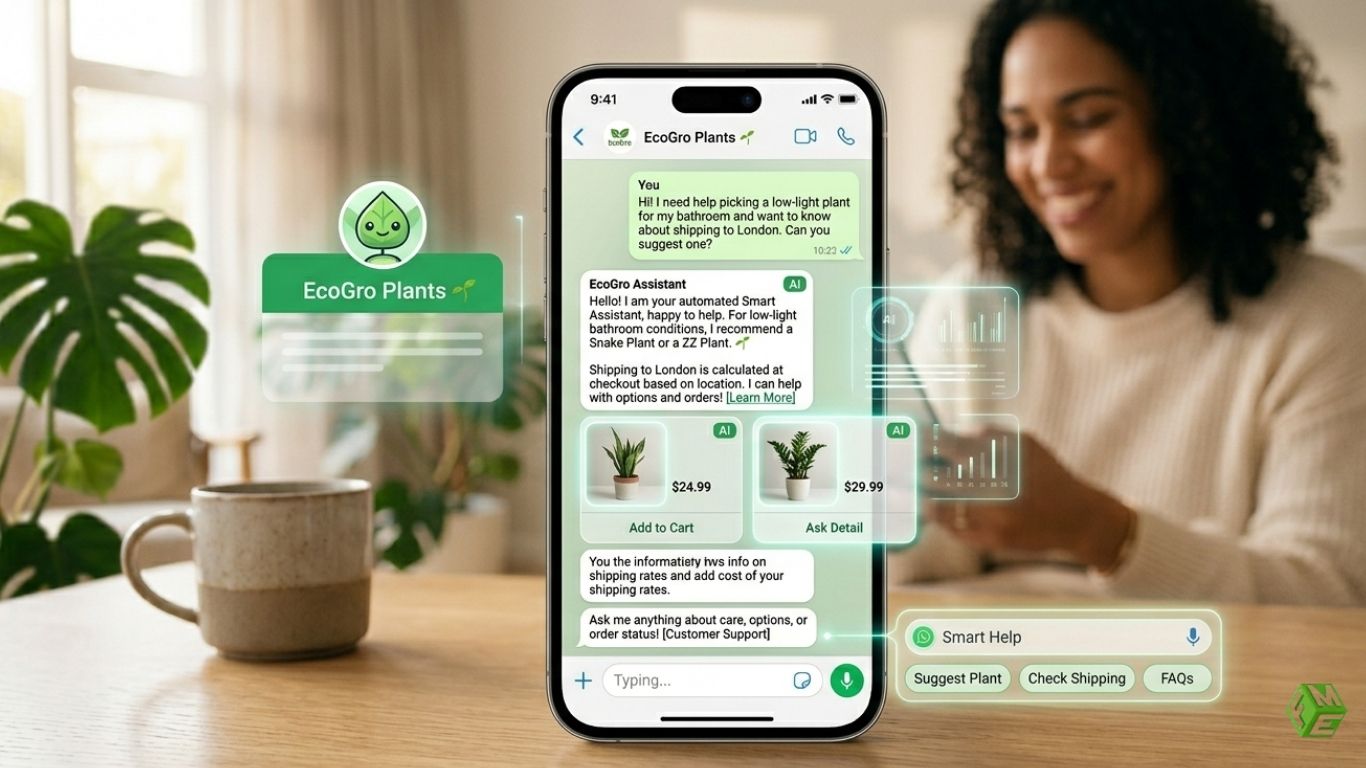
To avoid overwhelming your team, automation is vital for growing. Basic automation is supported by the FME module, while the WhatsApp Business tools module allows more complex automation.
FAQs with Automated Responses
Common questions on shipment, returns, or payment types can be answered with automatic responses.
Example: For the question, “What’s the delivery time for this sofa?” the bot replies immediately: “Delivery usually takes 3 to 5 business days. Would you like to schedule a specific date?”
Automated Reminders for Abandoned Carts
Automatically remind customers of items in the cart that they did not purchase.
Say a customer named Sarah has this message: “Hi Sarah, you left the Classic Leather Tote in your cart. Order now to get free shipping today!
This customer engagement strategy diminishes the chances of a sale being lost, as well as enticing quicker purchases.
Automatic Order Messages
Based on certain behaviors, customer messages are automatically created and can be sent to the customer.
For example, if someone has added 3 headphones to their cart, WhatsApp will automatically open with a message that includes the items, their prices, and the total.
Integration of the Two Automations
For high-value items or products with complex queries, you can use a combination of chatbots and human agents.
For example, the chatbot can address all preliminary queries related to product specifications, and then direct the customer to a sales representative for bespoke orders, such as for furniture or jewelry.
Why Do We Use Automation
Admins save time, yet the customer still has a personalized experience, and the interaction remains conversational as well as responsive.
Fast responses are guaranteed, and this diminishes friction and improves the chances the customer will make a purchase.
Even during non-working hours, your business can still engage with your customers.
Use Cases: How Merchants Use WhatsApp Chat & Orders
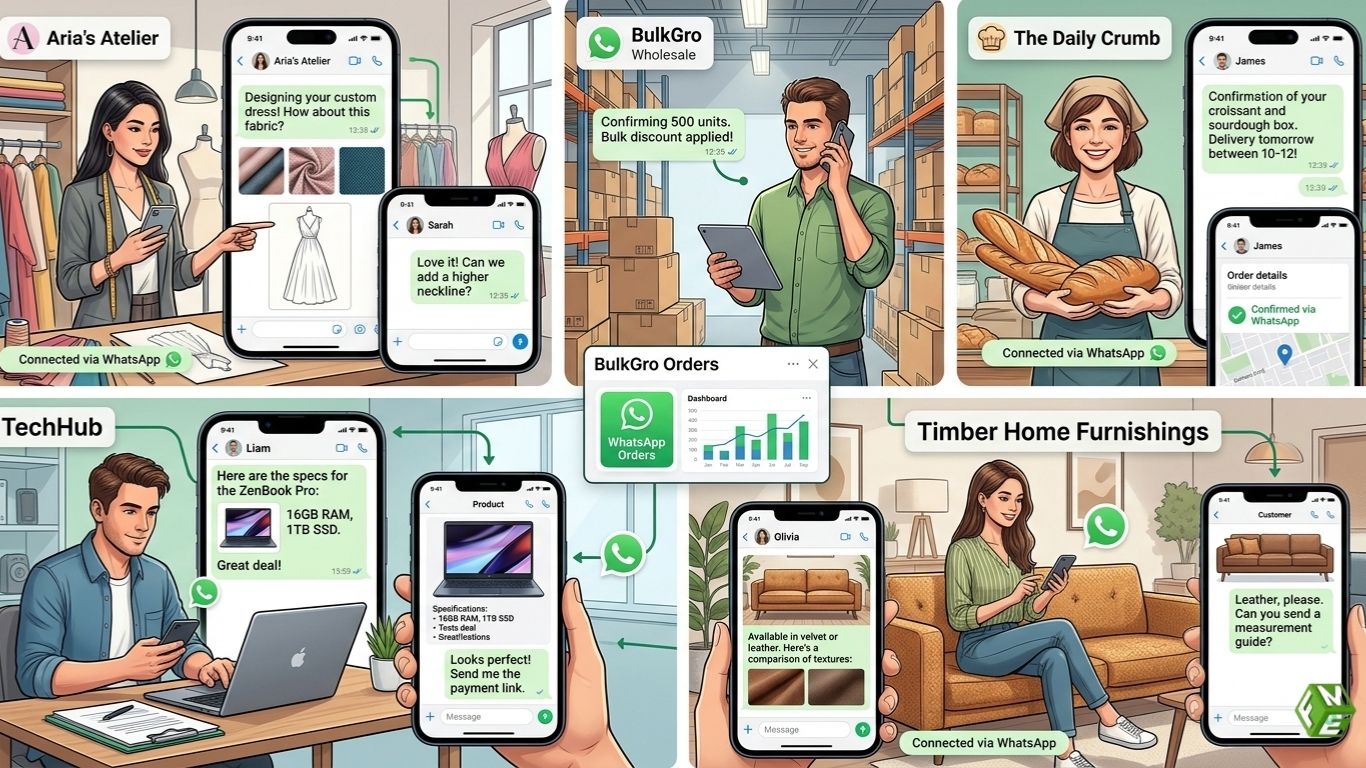
The integration of WhatsApp on PrestaShop is not merely a tool for customer support, but a complete sales channel. This whatsapp ecommerce integration facilitates better communication, sales and personalized shopping experiences. Here are some industry-specific whatsapp order use cases:
Fashion & Custom Products
Apparel, accessories, and bespoke items often lead to customer inquiries regarding sizing, colors or customization. With PrestaShop WhatsApp chat setup, customers can finalize these details in real time.
As an example, a customer purchasing a made-to-measure dress can send photos of herself and/or provide measurements through WhatsApp, and the merchant can confirm that the dress is available and even propose alternatives. This improves customer experience and decreases mistakes, returns and abandoned shopping carts.
Electronics & Pre-Sale Questions
Customers in the electronics industry often have purchasing questions to avoid post-purchase regrets. Queries may include the specifications of a product, its compatibility with something they may already own, or the warranty of the product. With WhatsApp, merchants can clarify these questions in real time.
As an example, a customer inquiring about a laptop may have questions about the RAM, storage and whether there is any pre-installed software. The admin can send the laptop specifications or even comparison charts through WhatsApp. This improves customer trust, decreases returns and fast-tracks sales.
B2B Bulk Orders
Negotiation and confirmation are critical to bulk or wholesale orders, making WhatsApp incredibly valuable. Businesses can liaise on volume pricing, stock availability, and shipping timelines. For instance, if a retailer purchases 500 units of a skin care product, he can confirm stock, negotiate discounts, and make a payment, all via WhatsApp. This also eliminates lengthy email threads and optimizes the B2B buying journey.
Local Delivery & COD Markets
In cash-on-delivery (COD) markets, customers typically purchase goods before payment, making WhatsApp an ideal tool to streamline order placement and delivery coordination. Customers can confirm delivery addresses, times, or any changes before delivery.
As an example, a local bakery can accept orders via WhatsApp for on-the-day delivery, inform customers prior to the delivery, and provide payment instructions via COD.
High-Ticket Product Consultations
When it comes to buying furniture, jewelry, or appliances, customers often require lots of assurance and guidance before they are willing to buy the product due to its high cost. Merchants can provide consultations via WhatsApp, where they can answer questions and provide instructions via videos, images, or product demonstrations.
As an example, a customer looking for a high-end sofa can be sent chat messages with measurements, fabric selections, and delivery time estimates, thereby making closing high-ticket deals more achievable.
More use cases for WhatsApp
- Event tickets and reservations: Customers can book tickets and make payments right from WhatsApp.
- Subscription products: WhatsApp can be used by merchants to send renewal reminders or notify customers of new products.
Limited edition or flash sales: Personalized and time-sensitive messages to customers increase urgency and sales.
WhatsApp Chat vs Live Chat vs Email Support
|
Feature |
|
Live Chat |
|
|
Response time |
Instant |
Moderate |
Slow |
|
Conversion rate |
High |
Medium |
Low |
|
Customer comfort |
Very high |
Medium |
Low |
|
Automation potential |
High |
Medium |
High |
WhatsApp offers faster responses and higher engagement than traditional live chat or email, making it ideal for mobile-first shoppers. Unlike email, conversations are persistent and personal, building trust and improving conversion. Live chat is useful on desktop but often limited in availability, whereas WhatsApp ensures customers can reach the store anytime, even outside working hours.
SEO, CRO & Sales Advantages of the WhatsApp Integration
With the integration of WhatsApp and PrestaShop, the WhatsApp order confirmation feature also helps customers with order confirmation and keeps customers engaged and involved with the buying process, eliminating shopping cart abandonment.
Decrease Shopping Cart Abandonment
With the feature of WhatsApp order confirmation integration with PrestaShop, customers can easily and instantly confirm their orders, which will significantly help decrease shopping cart abandonment.
Take, for example, a shopper who is hesitant to make a purchase, in this case a handbag, because of the uncertainty of the color options. She will be able to message the store and get an answer in the next few minutes, which will avoid leaving the store and abandoning the cart.
Enhance Engagement and Time Spent Per Visit
With the direct chat feature, customers are able to increase the time spent on the site and engage more with the other products available. For example, a customer purchasing a smartphone may inquire about an available accessory or a device upgrade, which in turn will provide the opportunity for the sellers to make an upsell or cross-sell offer.
Optimized Mobile-First Checkout
With WhatsApp, customers can complete their checkout and purchase process using their mobile phones at any time. For example, the checkout process is made faster and more reliable because of real-time clarifications and payment links that are provided through the chat. Custom furniture and electronics are considered high-value items. It has been tested that in whatsapp chat vs checkout PrestaShop, the earlier works very well.
Increasing Conversions and Repeat Purchases
By utilizing conversational commerce, along with automated tools like pre-filled messages, shared carts, and payment links, stores can boost their sales and promote repeat orders. Customers are more likely to order again from a store where they feel loyalty and increased lifetime value on a channel with previous order conversations.
Retrieving Abandoned Carts
Merchants can take a proactive approach to the retrieval of abandoned carts by using customized messages. An example message is:
“Hi Emma, we noticed you left the Classic Leather Tote in your cart. It’s still available, and we can reserve it for you today!”
This type of personalized engagement also improves customer experience as it prevents lost sales.
What Makes the FME WhatsApp Order & Chat Module Stand Out?
In addition to simple click-to-chat, the FME WhatsApp Order & Chat Module combines chat support and complete order management for PrestaShop stores. Its use requires no modification, as it works seamlessly on all themes and devices.
FME has built a trustworthy solution for stores to customize shopping experiences, reduce cart abandonment, and improve engagement in the PrestaShop marketplace. Additionally, they offer personalized shopping experiences using WhatsApp and stay up to date with marketplace changes.
Take Away
PrestaShop stores can use WhatsApp as a new trade channel. Trust, order process, and cart abandonment can be improved through WhatsApp, as Fast, Personal, and high-converting interactions are possible.
FME’s WhatsApp Order & Chat Module provides real-time chat, WhatsApp checkout, and automated messaging. This enhances mobile shopping and encourages increased sales through effortless and repeated shopping.
