


Selling customizable or multi-component products in PrestaShop can be challenging. Standard product pages are designed for simple items, but they often fall short when customers need to choose multiple parts, add-ons, or configurations before purchasing.
This is where PrestaShop composite products come in. With product builders and configurators, merchants can let customers create personalised products step-by-step, making it easier for store owners, B2B sellers, and businesses offering customizable products to deliver flexible buying experiences.
What Are Composite Products in PrestaShop?
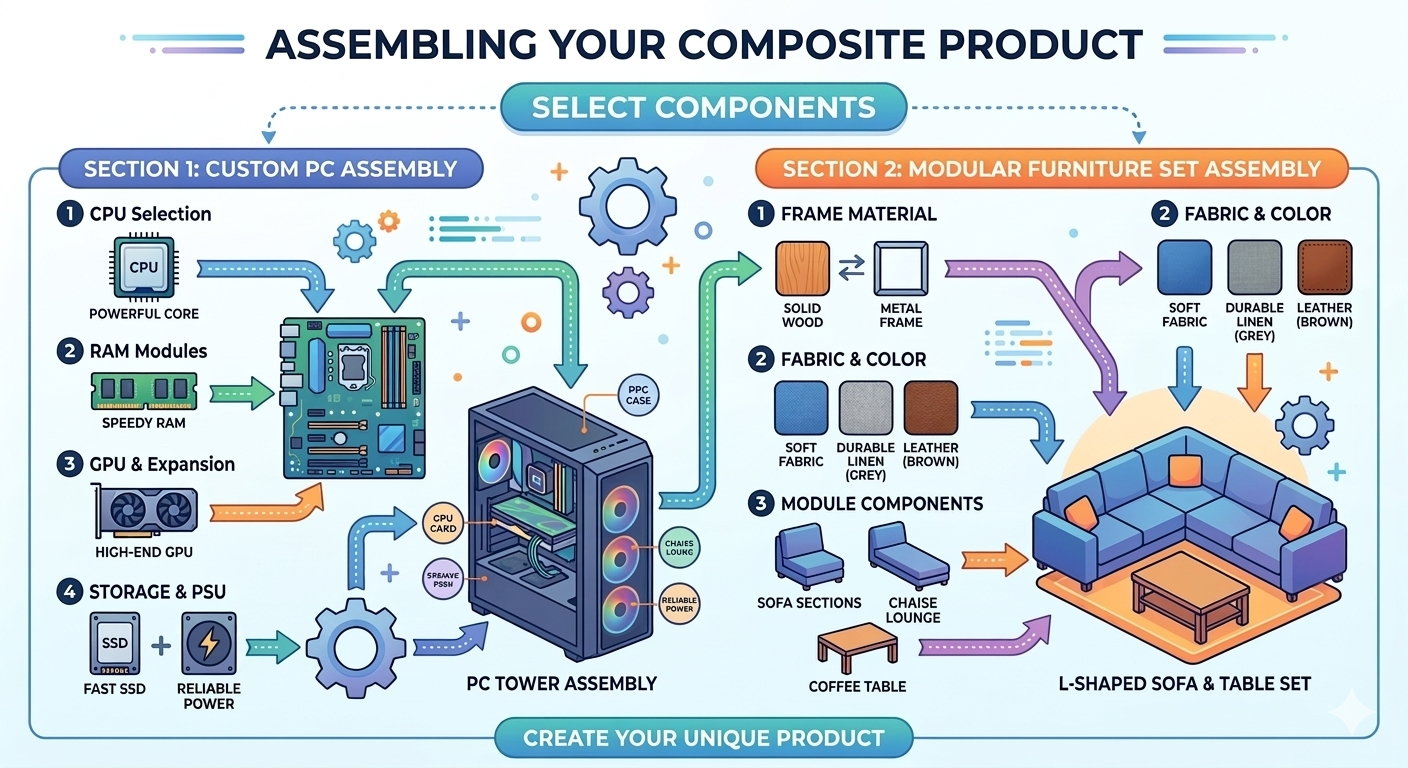
Composite products in PrestaShop are built from multiple components, allowing customers to select and combine different items to create a final product. Instead of purchasing a single predefined item, buyers can configure the product by choosing specific parts, accessories, or variations that match their needs.
In a nutshell, the prewholesale store for composite products lets customers decide how a product will be assembled before checkout. These components are like building blocks, so the end product is determined by customer choices.
For instance, several online stores make use of composite products to sell personalizable products like:
- Custom PCs in which customers specify the processor, RAM, storage and graphics card.
- Furniture groups in which buyers choose materials, colors or extra pieces.
- Meal kits with options for ingredient selections, portion sizes or add-ons.
The customer does not have to swim through dozens of individual product pages; everything is configured in a single guided environment. This enhances the buying experience, making product selection faster and more transparent.
Key Characteristics of Composite Products
Composite products tend to feature a few signature elements, such as:
- Guided configuration that helps customers work through their selection.
- Dynamic pricing updates based on selected components.
- PrestaShop product customization capabilities based on the product variation.
- Custom-generated end product appended to the cart.
This flexibility explains why composite products are commonly used for building PrestaShop configurable products, providing far more diverse configurations than standard product classes.
Composite is used to implement very extensive configuration options and differs from dynamic product bundles or simple configurable products.
Let’s now get into how composite product configuration works in PrestaShop and what customers see when using product builders.
How Composite Products Work in PrestaShop (Conceptual Flow)
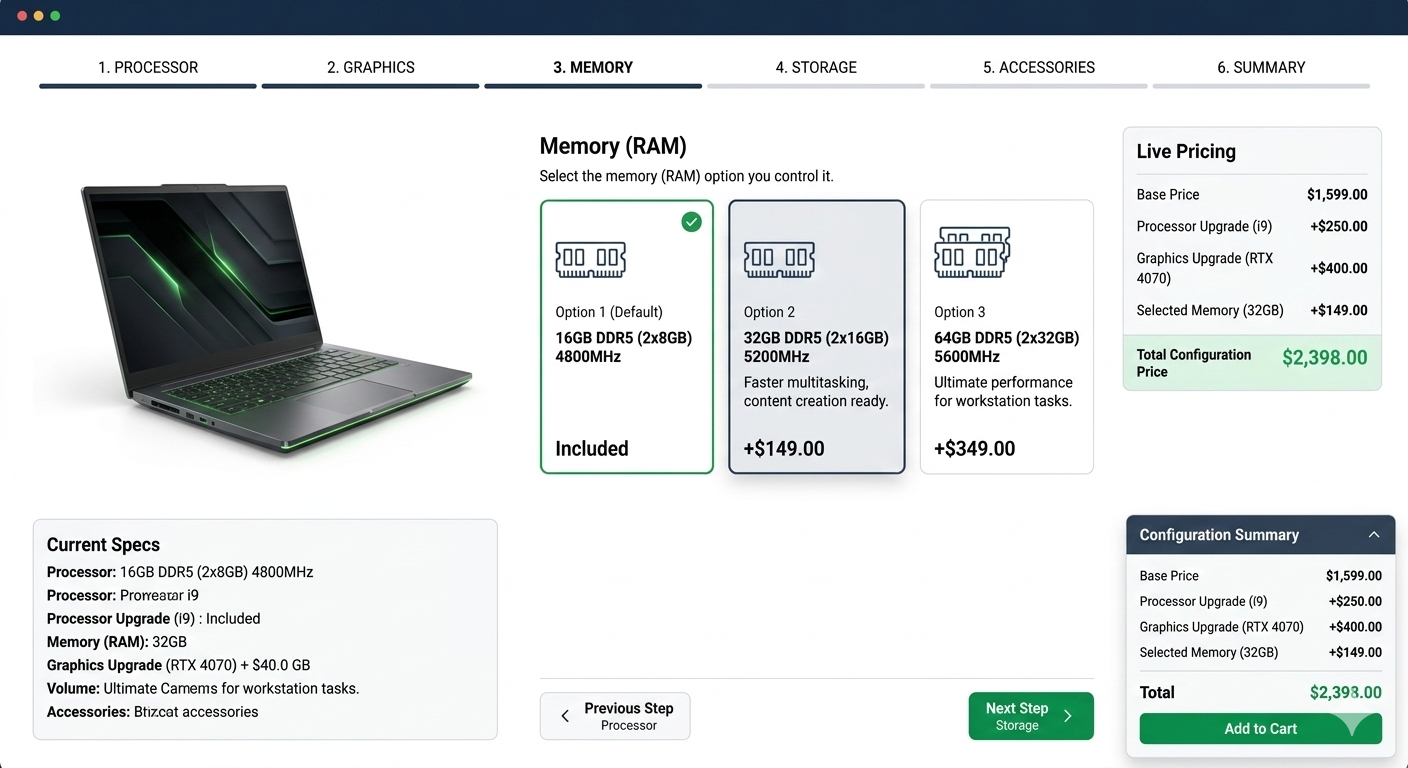
When customers configure composite products in PrestaShop, they do so in steps. This type of guided experience simplifies complex product purchases while giving shoppers full control over how their final product is configured.
Customer-Side Flow
For the customer, the journey begins on a product page featuring an interactive PrestaShop product builder interface. Rather than a conventional “Add to Cart” option, customers are led through a configuration experience.
Here’s how the average customer flow works:
Selecting Components
Starting with the base product, or first required element. This could mean choosing a model, size, or main element that will form the blueprint for your end product.
Step-by-Step Navigation
The Prestashop bundle builder walks users through a few configuration steps, which might include picking accessories, upgrades or complementary items.
Real-Time Price Updates
The total price automatically updates as customers add or change components. This transparency lets customers know how much each choice costs in dollars.
Configuration Summary
A final product summary allows customers to review all their selected components before adding the product to the cart.
Improving the experience in product configuration ecommerce and minimizing user confusion when choosing complex products can be achieved through this structured approach.
Admin-Side Logic
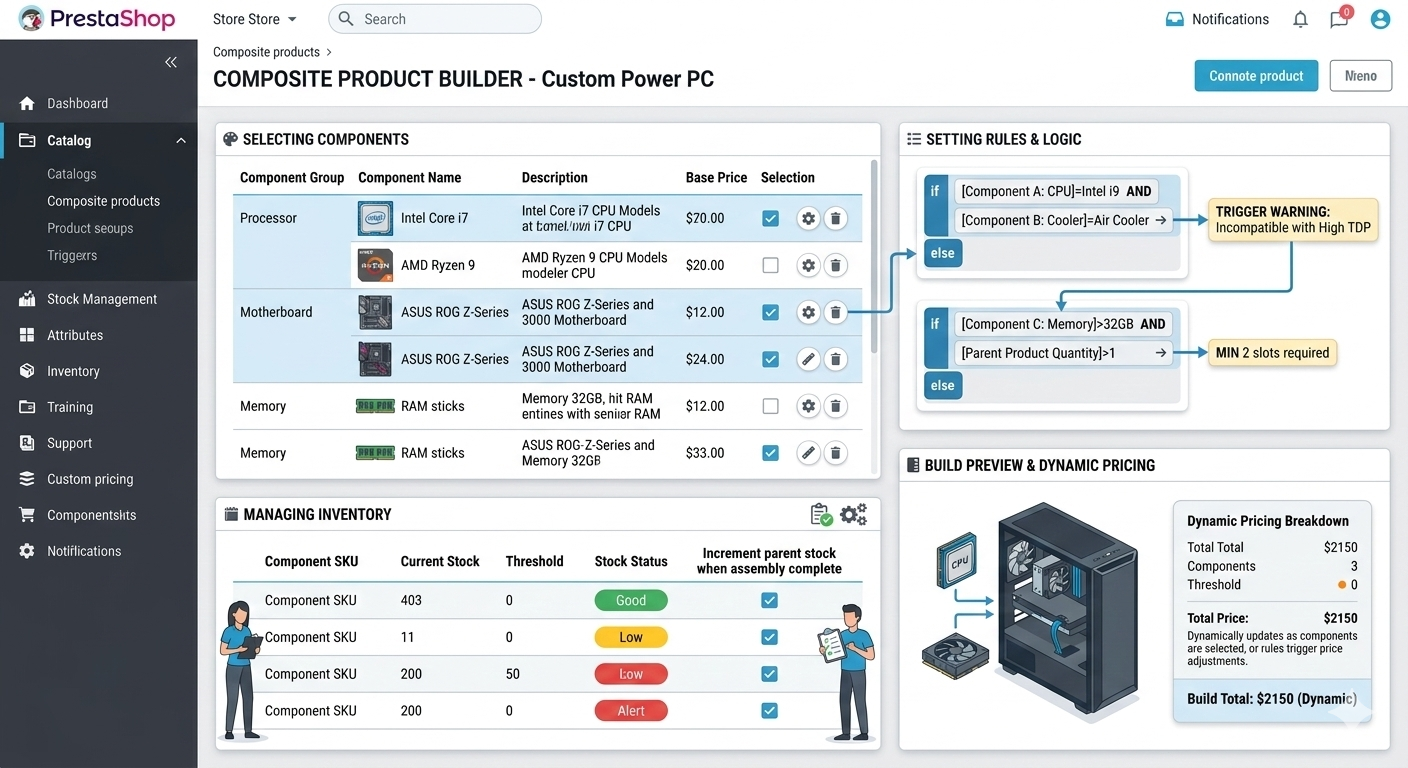
Under the hood, store administrators configure composite product behavior via setting rules and associating products.
The typical admin workflow includes:
- Creating product components that can be selected by customers.
- Assigning products or categories as available options in each step.
- Defining configuration rules, such as mandatory or optional selections.
- Managing combinations and dependencies between components.
- Handling inventory and stock levels for each included item.
This composite product setup allows store owners to build flexible product structures while keeping inventory and pricing organized.
When implemented properly, a PrestaShop product builder creates a seamless bridge between customer customization and backend product management.
Composite vs Bundle Products vs Configurable Products
Let’s overview the differences among composite products, bundle products, and configurable products to help you find a suitable solution for your PrestaShop store. Properly utilized, they provide a release for merchants and customers in distinction to their use. Here’a a quick composite vs bundle products:
Composite Products
- Flexible and customer-driven: Customers can choose parts, add-ons or versions to configure a custom product.
- Supported complex logic: Add-ons optional or mandatory, conditional selections, and dynamic pricing.
- Use cases: Custom PCs, furniture sets, meal kits and any product requiring multiple selections.
Bundle Products
- Bundled products: The customer buys a predetermined grouping of items sold together.
- No customization: Purchasers cannot swap parts or make many changes to the bundle.
- Use case: Gift sets, pre-packaged kits, or promotional bundles.
Configurable Products
- Attribute-related variations: Customers select from preset attributes like size, color, or material.
- Simpler logic: Just a straightforward combination of one/two attributes + limited stock.
- Use case: Clothing, shoes or small electronics with standard deviations.
Common Use Cases for PrestaShop Composite Products
Composite products are versatile and can be used in various industries and business models. Not only do they offer flexibility, but they also provide a better purchase experience than proper or bundled products by letting customers assemble them from individual ingredients.
Custom-Built Products
Many stores use composite products to let customers customize their items completely.
Examples include:
- Custom PCs: Choose processor, RAM, storage, GPU and accessories.
- Camera kits: Lenses, tripods and memory cards.
- Furniture sets: Select materials, colors and extras.
Subscription Boxes & Kits
Composite products lend themselves well to subscription models or curated kits:
- Meal Kits: Customers select ingredients, portion size or add-ons.
- Beauty Boxes: Choose preferred items from a selection.
- DIY Kits: Select parts needed for a project.
B2B Product Configurations
Composite products for complex orders for B2B sellers:
- Industrial Equipment: Choose machine parts or optional add-ons.
- Kits For Wholesale: Group similar items into bulk packs designed for companies.
- Custom Machinery Parts: (Helps with) configurable selections on the client side.
Upsell-Driven Product Builders
Composite products also support upsells and cross-sells by prompting customers to upgrade their purchase:
- Include high-end features or upgrades.
- Add matching accessories.
- Provide extended warranties or maintenance packages.
With PrestaShop product builder or PrestaShop product configurator add-ons, merchants can boost average order value, enhance customer satisfaction, and minimize abandoned carts.
This superior balance, leading to a more engaging shopping experience, drives their performance better than simple product pages.
Benefits of Using a PrestaShop Composite Products Module
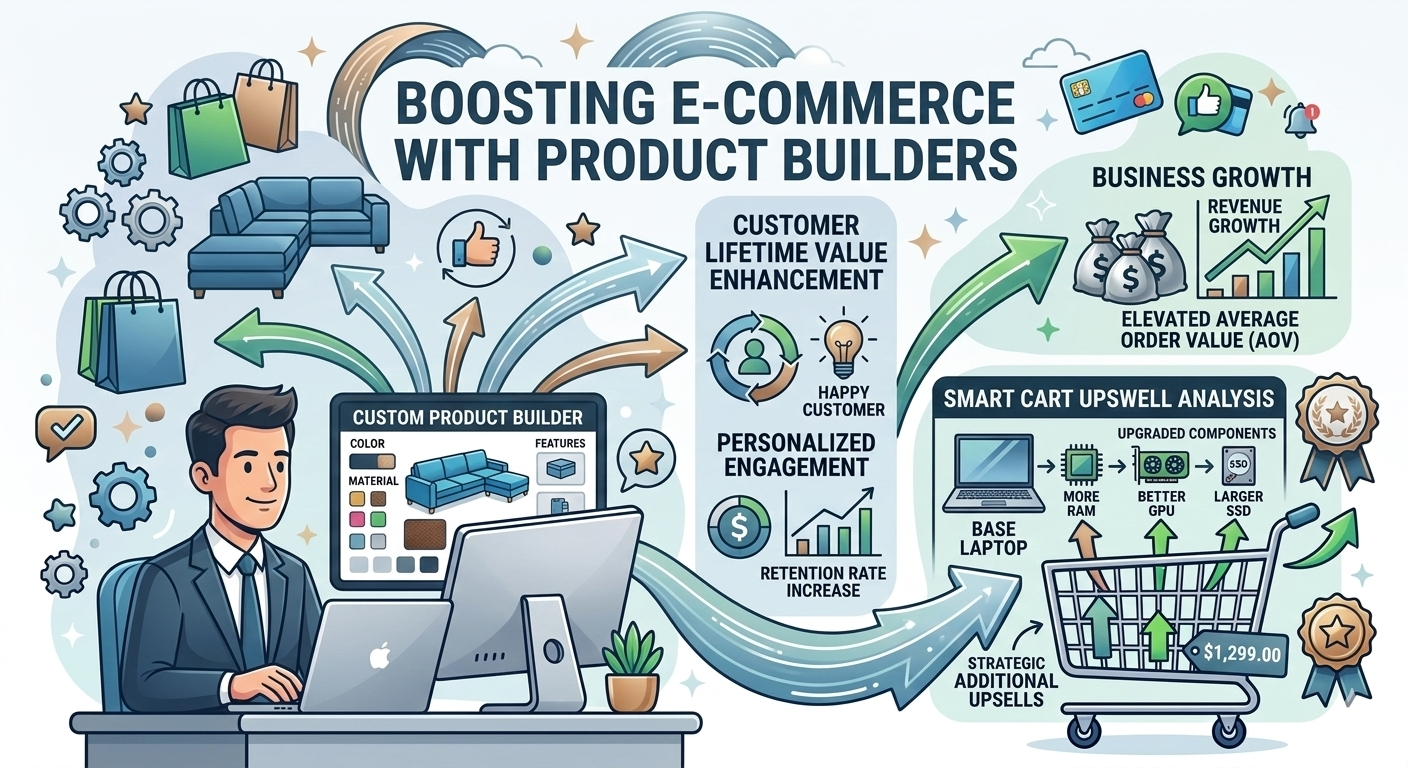
It's not only a matter of flexibility, as a composite products module in your PrestaShop store yields tangible business results. It improves the shopping process, provides better revenue opportunities and more manageable products.
Key Benefits
- Increased average order value (AOV): Customers typically include optional parts or upgrades, thereby increasing cart totals.
- Less Clutter on Product Pages: Rather than dozens of static listings, only one configurable product is available, reducing navigation overhead.
- Enhanced Customer Experience: Sequential selection helps remove confusion and provides a personalized customer journey.
- Improved Control for Upsell & Cross-Sell: Admins can strategically place complementary products within the builder.
Before vs After Scenario
- Before: Customers browse several product pages, estimate compatibility, and make a selection error.
- After: A single combined product enables each of them to configure all components, see real-time composite product pricing and understand exactly what the final product will include.
Store owners gain both operational efficiency and stronger sales performance with a PrestaShop composite products module, creating a more engaging, tailored shopping experience for consumers.
How To Choose The Best PrestaShop Product Configurator Module?
This means flexibility, usability, and flawless operation of the PrestaShop upsell bundle modules across devices, improving the Admin & Customer Journey.
Must-Have Features
- Step-Based Builder: Walks customers through the assembly process in easy, logical steps.
- Conditional Logic: Mandatory/optional parts and rules between selections.
- Dynamic Pricing: Totals update in real-time as components are added or changed.
- Inventory Synchronization: Maintains inventory for every component to avoid overselling.
- Mobile Responsiveness: Provides a smooth UX on phones and tablets.
- SEO-Friendly URL: Search Engines can properly index product variations.
- Admin Setup Made Easy: Component setup is simplified with step-by-step instructions and combinations.
- Version Compatibility: Compatible with multiple PrestaShop versions, ensuring a stable solution for the future.
Modules such as the Composite Products Builder by FME Modules satisfy all this functionality while also being further developed and easy to use.
How The Innovative PrestaShop Composite Product Builder Module Works
The Multi-Layered Product Module is designed to help both admins and customers set up products and explore them more easily!
Admin Configuration Overview
- Add Components: Easily offer products, categories, or custom items as selectable components.
- Step Ranking: Systematically guide the selection process into steps.
- Pricing model: Specify base prices and dynamic pricing rules for each component.
- Inventory Control: Monitor inventory levels for each product to prevent overselling.
Frontend Customer Experience
- Sleek UI: Customers navigate a clean, step-by-step builder without confusion.
- Real-Time Updates: Selections and pricing refresh in real time when components are selected.
- Mobile Flow: Optimized for tablets and smartphones, providing a seamless experience.
SEO & Conversion Advantages of Composite Products
Beyond enhancing the shopping experience in your PrestaShop store, implementing composite products delivers measurable SEO and conversion benefits. The structured, interactive product pages help keep customers on your site longer (this can positively impact search rankings and lower bounce rates).
Key benefits include:
- Long-Tail Keyword Coverage: This way, each component and configuration generates different URLs that may match specific search queries.
- Enhanced Dwell Time: Page-by-page product builders keep visitors engaged on the page, which signals value to search engines.
- Improved Internal Linking: Component pages naturally link to related product pages, strengthening your site architecture.
- Advanced Content Marketing Support: Since composite products are inherently aggregated, they can be featured in popular, trending blog posts, lists, tutorials, or how-to guides, thereby enhancing their relevance and discoverability.
Google wants its product experiences to be well-designed and friendly. Interactive, customizable products help your shop reach more people through organic traffic and turn visitors into customers.
Guide for Selling Composite Products and SEO Optimization
Composite products are just the first step, but to ensure higher sales and better search engine visibility, single-product optimization should go hand in hand. To help new PrestaShop composite products maximize their impact, here are some practical tips.
Use Clear Component Descriptions
Write a clear and simple explanation of what each part does. Do not forget features, benefits, and compatibility details. Clear descriptions eliminate confusion and give buyers confidence.
Offer Recommended Defaults
Ensure to guide customers well and ease decision fatigue. This encourages customers to choose the defaults, thereby increasing average order value.
Optimise Product URLs and Metadata
All composite product configurations should automatically generate SEO-friendly, clean URLs. Set distinct meta titles and descriptions for your high-value product combinations to enhance organic search visibility.
Highlight Upsells and Cross-Sells
Within the builder, suggest complementary items, upgraded items or accessories. The best upsells and cross-sells are those that drive revenue without interfering with the user experience.
Test Mobile and Desktop Experiences
The builder should be compatible with all devices. Enhancing User Engagement: Step-based layouts, responsive buttons with changing text, and clear pricing updates. This will keep customers engaged longer and usually lead to lower bounce rates.
Monitor Analytics and Adjust
Monitor which items are most chosen, abandoned, and ignored. Refine component options, pricing and recommended defaults based on this data. So your composite products are always optimized for conversions and inventory.
Common Mistakes To Avoid When Creating Composite Products
A good PrestaShop product builder can do wonders, but a poor implementation could render it useless. Here are some common traps that could cause disrupted customer journeys and affect conversion rates:
- Overcomplicated Steps: The more selections there are, the higher the abandonment rate.
- No Defaults: Starting from scratch is friction; set defaults to recommended options.
- Lack of Pricing Transparency: Shoppers can be irritated by hidden costs or unclear pricing for components.
- Not optimizing Mobile UX: A mobile-unfriendly builder will lower engagement on cellular devices like smartphones and tablets.
Tackling these challenges will allow you to form a more cohesive, trustworthy, and profitable composite product experience.
Do You Need A Composite Product Builder In Your PrestaShop Store?
A composite product builder is only necessary if your product catalog and goals require it. Use this quick checklist to decide if you actually need a product builder in your Presta store:
Do you sell customizable products? A composite product builder might be a good fit if your items have multiple variations or optional components.
Do customers often request the same custom setups? The immediate demand for personalization shows clear potential ROI.
Are you looking to boost Average Order Value (AOV)? Upsells and Add-ons Come Naturally to Builders
Fit between merchant models: B2B merchants can leverage complex product assemblies, while B2C storefronts benefit from personalized kits or bundles.
Consideration at larger stores: Even small shops can utilize a builder for flagship products to improve sales.
If you have these conditions, add a PrestaShop composite products module to improve operational efficiency, enhance the customer experience, and boost sales.
Final Thoughts
The composite products in PrestaShop enhance the customer experience with your store by bringing personalization, transparency, and a more enjoyable shopping experience. Introducing a product builder or configurator enables merchants to increase product conversions, improve average order value, and simplify managing complex products.
The Composite Products Builder Module makes creating the products you want super easy, delivers them straight to your customers with step-by-step guidance, and ensures SEO and sales optimization in your store!
